Showing posts with label note taking. Show all posts

Friday, February 24, 2012

Post-it Notables


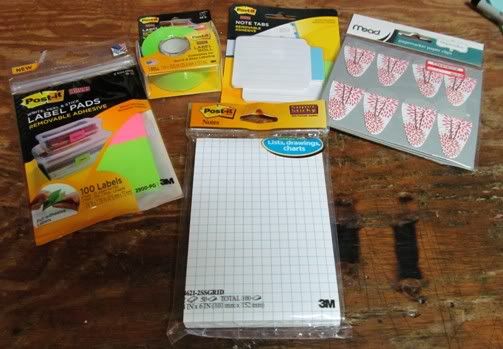
From Center front clockwise:

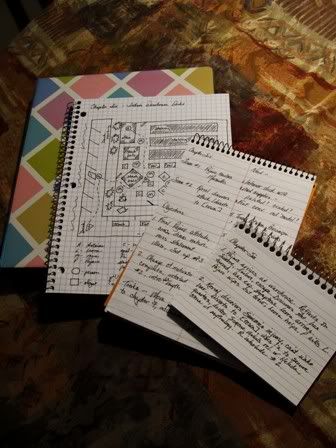
Post-it Grid Notes: 2 pads of 50 4" X 6" sheets, $3.63. Quilters use grid paper to figure out patchwork designs; I know some writers prefer grid paper for writing, drawing maps and what have you. I like the roomy size of these notepads.

Post-it Label Pads: 100 1-7/8" X 2-7/8" labels in neon pink and green, full-adhesive backing but still removable, $2.99. Often I reuse storage boxes and containers for various purposes from year to year, so removable labels are more convenient. These would also come in handy to mark the front of binders and folders when I recycle them.

Post-it Label Roll: 1" X 700", neon green full-adhesive backing but still removable, $3.14 (clearance price). If the label pads are too short, I can use this to cut the length I need.

Post-it Note Tabs: 20 2-3/4" X 3-3/8" tabbed notes with removable adhesive, $2.69. These are extremely cool. Not only are they tabbed but they have a small lined section for notes. If you hate marking up books, manuscripts or other paper documents during editing these would give you some writing space and mark the page you need to return to (I'm going to use mine for galley corrections; will eliminate the need to make two piles of pages.)

And finally, not Post-it brand, but still neat:

Mead Pagemarker Clips: 24 two-sided paper tab-backed clips, $1.98 (clearance priced). I thought these were a clever spin on the bookmark, as you can write a word or two on both sides and then they'll work as tabs or tabbed dividers without having to put in a whole tab page. Good for marking passages in research books for easy future reference.

All found at Target, which often has much in the way of Post-it coolness.

Wednesday, April 06, 2011

No-Tech Note Solutions

While I do love the convenience and efficiency of technology, as a writer I don't think I'll ever trust it. I am ruthless about backing up my work, which improves the odds of avoiding technology-created problems, but at least once a year I still lose something. No matter how careful I am, all it takes is one power outage during a work session and hours of work can go poof. And the problem isn't mine alone -- ask any writer, and I bet they have stories about files becoming corrupted, programs glitches sending a manuscript to NeverGetItBackLand and the ultimate horror, a complete hard drive melt down.

The rapid advancement of technology also has another, built-in problem for writers who have been in the game for longer than a few years: it renders older technology obsolete and unusable, and by extension, anything you used them to create. Sure, I have multiple copies of every book I've ever written backed up and saved. About a fourth of those backups are now unusable because my current writing software can't convert the old file formats from the programs I used in the past. If ever decided to reprint my old Gena Hale romances, for example, I'd have to either retype the manuscripts or scan each page from my old hard copies and digitally convert them.

There are all kinds of new tech solutions to old tech problems, but sometimes technology simply interferes too much with my writing process for me to use it. Like note-taking. I could keep notes on the computer in some form or another and multi-task between documents or programs while writing. The thing is, I don't like jumping from one window to another when I'm writing; it destroys my rhythm and my momentum. I also like to be able to look at my story notes while I'm actively writing. This is why I still keep my notes in some hard copy form on my work station. I also like playing with office supplies, so over the years I've come up with some interesting, no-tech ways to manage the notes I use while writing:
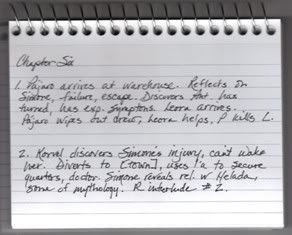
Chapter Summary Deck

I admit, I've never been a huge fan of index cards. Because they're loose they're easy to shuffle out of order or misplace; they're really too small to contain much info, the only way to hold them together was by rubberbanding them, and a stack is usually too bulky to comfortable stow in the binder pocket of my novel notebook.

After years of working straight from a printed copy of a synopsis, I started experimenting with ways to break down a novel into brief chapter summaries. I tried small notepads, sticky notes and then decided to look at index cards again. That was when I discovered spiral-bound index cards. While the lines are still too narrow, binding the index cards into a deck solved all the other problems I had with them. When I'm finished, I simply hook the deck's spiral binding through the top clip of my novel notebook binder, which keeps it neatly in place.

Now I'm constantly finding new ways to use spiral-bound index cards: as character stat indexes, series mini-encyclopedias (when you invent an entire new universe, just trying to keep tracking of the names of all the different worlds can be a real headache), personal style Bibles and more.
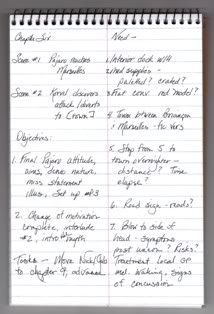
Steno Noting

When I was a kid I never had enough paper to write on, and since new paper was too expensive to constantly buy, my mom got me into recycling used paper long before it was fashionable. My favorite recycled paper to use was the back of the pages in one of Mom's old steno pads. Instead of throwing them away when they were used up, she would bring them home from work and give them to me. Because she only wrote on one side of the pages, I'd just flip the book over and write my poems on the blank sides. I loved that red line running down the center of the page because I'd write my poem on the left side of the line and then use the right side to jot down alternative words and phrase ideas when I edited the poem.

I still use steno pads, which I buy new by the dozen from the local dollar store. Those two-column pages are great for writing everything from pro and con lists to character comparisons. When I'm working on a novel, I jot down my chapter objectives on the left side and while I'm writing make notes about things I need to find out, check in my research notes or otherwise redo during my daily editing session.

Steno pads also serve as excellent checklists (put your items on one side, and check off or date when you complete them on the other); daily quota tally sheets (list your dates and daily totals on the left and your running monthly total on the right) and even a simple planner for your week (days of the week on the left, lists of what you plan to do each day on the right.) Steno pads are also wonderful for compiling lists of title ideas, because you can run a column of ideas down one side and then jot some variations of the idea beside them.
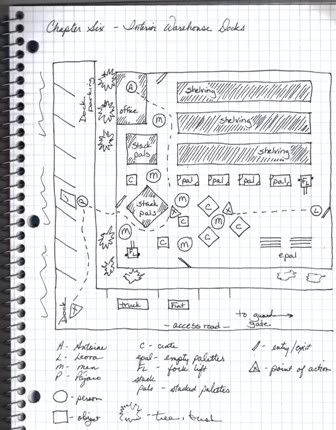
Graph Paper Mapping

Many writers are insanely talented map makers and floor-plan creators, and a few rank right up there with professional cartographers and architects. Sadly, I am not one of these gifted folks. Using freehand, I couldn't map my way out of a 5X5 square cardboard box. Whenever I desperately needed to lay out a fictional location or make up a floor plan so I could choreograph a scene, I had to rely on what was in my head, or draw something that looked like driving directions an inebriated dyslexic had penned in complete darkness in felt-tip on a cocktail napkin.

Graph paper finally came to my rescue (via my quilting, no less.) Whenever I design a pattern for a patchwork quilt, I use graph paper because the little squares help keep my lines straight, and are easy to count when I'm trying to figure out proportions. After screwing up yet another hand-drawn blue print of a fictional location, in frustration I pulled out a graph paper pad to work on a quilt pattern design. At last the light bulb went on and I tried drawing my floor plan again, this time thinking about the design the same way I did a quilt block and using the squares on the graph paper as a line guide and an area mapper. Worked fabulously for me, and now I use graph paper for everything I map out.

Have you come up with any no-tech and/or non-tradition ways to manage your notes? Share your tips in comments.
Monday, March 02, 2009

Take Note Ten

Ten Things to Help with Note Taking

Freeware caution: always scan free downloads of anything for bugs and other threats before dumping the programs into your hard drive.

Dustin Wax's article Advice for Students: Taking Notes That Work also offers some great tips for writers who want to improve their note-taking skills.

Efficient Sticky Notes will allow you to "Stick your notes on the desktop and you can read important information at any time on the screen. It saves your money and saves your time! The software allows various background colors, with optional gradient effect, to be set for the sticky notes. You can also customize the font of each note and set it to be semi-transparent so it will not fully cover up your desktop background or icons. To fully protect your privacy, the software encrypts the login password with the irreversible SHA algorithm and also encrypts data files. Besides, it offers various special features such as managing sticky notes by group, setting note importance, tracking the creation time and last modification time of notes, adding attachments to notes, Recycle Bin, etc." (OS: Win 98/ME/NT/2K/XP/2K3/Vista)

GlobonoteGloboNote is a simple and easy to use desktop note taking program(Sticky Note). It lets you organize your ideas, ToDOs, reminders in one place and allows you to find it easily. (OS: any that has Java 6 installed.)

Hott Notes is "the free sticky notes reminder program for your desktop. Totally free. No ads. No spy-ware. Not only can you post sticky note reminders, you can make checklists, set alarms, draw on your notes, and archive. Pumped? Download away!" (OS: Windows XP/2000)

Note-It offers "Enhanced desktop notes that persist windows sessions, give you control of the look and feel, allow you to save and open notes, provides special notes that provide updated information, drag text to and from any application, and even email the notes or just a selection of the note. Notes on your desktop have never been easier and with Note-It you get all the power you will ever need in note application" (OS: Win 98/ME/NT/2K/XP/2K3/Vista)

With Note Studio, "the priority is on getting the notes down quickly. It is inspired by wiki technology, which allows simple text formatting (headings, bold, italic, tables, etc), as well as pages which link together through hyperlinks. Dogmelon has found that people become much better organized when they start using Note Studio. Customers report that it is actually fun to make notes. The result? People make more notes, and their notes are actually useful. Note Studio was originally developed for handheld Palm devices. Dogmelon has learnt a lot of lessons for portable devices which apply equally to laptop or tablet PCs. An obvious example is security. A major concern for mobile users is having their important data compromised if their device is lost or stolen. Note Studio allows you to encrypt notebooks. This means that even if your device falls into the wrong hands, your notes will not be readable. But it is the ease of organizing notes that makes Note Studio most powerful. The way pages are organized in your notebook is very flexible. Because pages can contain links to other pages, your notebook can be arranged like a web-site. This allows simple, logical navigation through your notes. In case you're in a hurry, Note Studio includes a powerful search facility. Often you just vaguely remember that you made a note several months ago. With Note Studio you can search through all of your notebooks, to find the information you're after in seconds. (OS: Mac OSX 3.3.2)

For those who aren't familiar with notetaking techniques, CalPoly's Notetaking Systems page takes a look at the advantages and disadvantages of 5 different notetaking systems, explains how to do them, and shows examples.

Task List Task List is an one-stop management app for students. You can take notes, track assignments and grades, and set priorities, among a bevy of other handy student-y features. We've posted several great note taking apps for students (from Mac- and Windows-only to web-based note taking), but Task List is by far the most comprehensive student tool I've seen. Task List is freeware, Mac OS X only - complete with all the great iLife integration (with apps like Mail, iCal, iDisk if you have it) that can make your Mac such a handy place to work." -- Adam Pash, Lifehacker (OS: Mac OSX)

Tiny Notes is "a note/code organizer. It is meant as a small and simple tool that helps you organize small snippets of text, through which you can quickly search. Supports syntax highlighting" (OS: Win NT/2000/XP)

Wikipad is "a Wiki-like notebook for storing your thoughts, ideas, todo lists, contacts, or anything else you can think of to write down. What makes wikidPad different from other notepad applications is the ease with which you can cross-link your information. Links in a wiki are created by typing in WikiWords. A WikiWord is any mixed case word typed into the editor. TodoList or JohnDoe are example WikiWords. The term wiki means "quick" in Hawaiian, and wikis are all about quickly linking your information together. Wikis are not a new concept, in fact there are many web based wiki servers available" (OS: Win NT/2K/XP/2K3)