A few years back I test-drove RedNotebook, which has a new version that's just been released. This is one of the more interesting and easy-to-use electronic journal freewares out there, so I thought I'd post the info and links for anyone who is looking for a free electronic notebook or journaling program:
RedNotebook is a graphical diary and journal helping you keep track of notes and thoughts. It includes a calendar navigation, customizable templates, export functionality and word clouds. You can also format, tag and search your entries.
Features:
Enter text for individual days and navigate using a fancy calendar
Add Categories to days and fill them with content
Tag your entries
Format your text bold, italic or underlined
Insert Images, files and links to websites
Links and mail addresses are recognized automatically
(Live-) Search
Automatic saving
Backup to zip archive
Word Clouds with most often used words and tags
Templates for each weekday and arbitrarily named ones
Export the journal to PDF, HTML, Latex or plain text
Graphical preferences dialog
You can have multiple journals
RedNotebook is open source software, you are free to use and redistribute it under the terms of the GPL
Translated into 16 languages
The data is stored in plain text files, no database is needed
Direct PDF export
Markup highlighting
Use webkit more extensively
save your journals on a remote server (SSH, FTP, WebDAV)
RedNotebook is fully translated into 16 languages (make it speak your language)
Optional tray icon and spell checking
auto-completion and command line functionality
(OS: Win 98/ME/2000/XP/2003/Vista/7)
Showing posts with label RedNotebook. Show all posts
Showing posts with label RedNotebook. Show all posts
Tuesday, April 28, 2015


Wednesday, August 10, 2011
RedNotebook
While hunting for freeware I decided to download and test drive RedNotebook, which the designer describes as "a modern journal. It includes a calendar navigation, customizable templates, export functionality and word clouds. You can also format, tag and search your entries."
The Features:
Tagging
Format your text bold, italic or underlined
Insert Images, files and links to websites
Links and mail addresses are recognized automatically
Spell Check on Linux
Live-Search
Automatic saving
Backup to zip archive
Word Clouds with most often used words and tags
Templates
Export the journal to PDF, HTML, Latex or plain text
The data is stored in plain text files, no database is needed
Translated into more than 20 languages
As impressive as the features sounded, I just liked the look of it; it's very uncluttered and seemed like it would be easy to use. Which it definitely is. The download went so fast I didn't realize it was done, and the installation was a breeze (completely virus-free, too, when I scanned it.) When I started it up it came with instructions preloaded in the first work area, but you can delete these easily.
The program is calendar-based, which means you work under the date of your choosing (handy if you're looking for a virtual diary or task manager.) You can input text and images in the work area, which I really like a lot, and do things like bullets and titles and so forth. Here's a screenshot of my first entry (click on any image to see larger version):
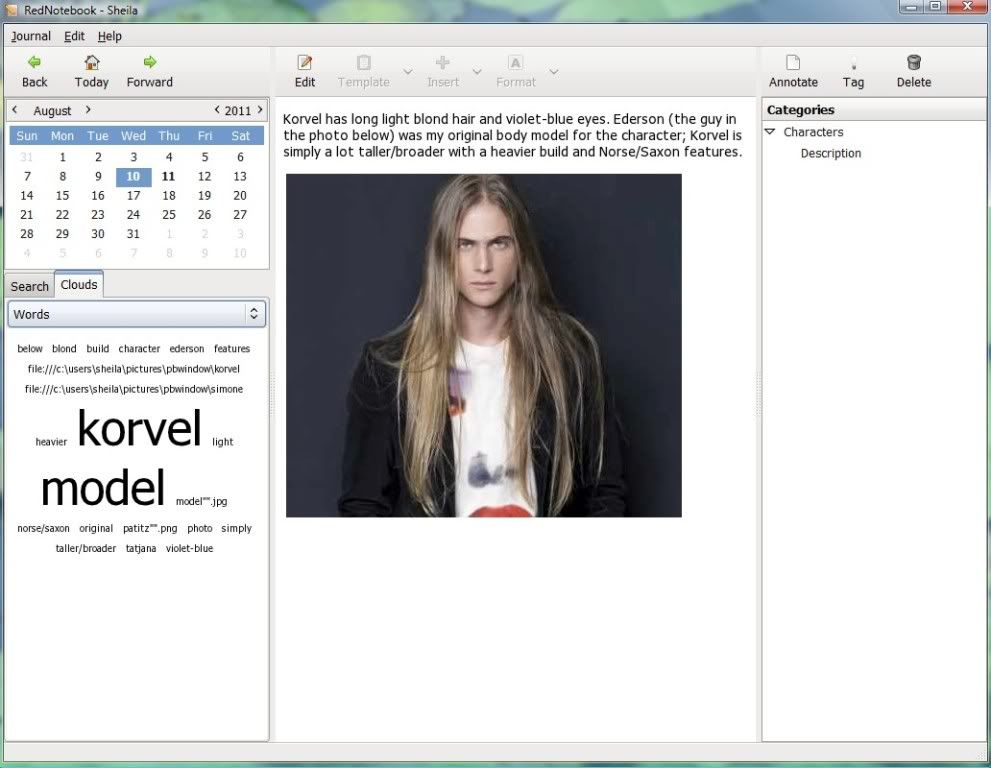
There aren't a huge amount of options; just enough for a working writer or someone who wants to organize their info. On the downside you can't print direct from RedNotebook, but you can easily export to .pdf, text file, html, etc., which is the next best thing. I really like that you can export a range of as much data as you want, anywhere from one day to all the days stored in the program.
Another feature I thought was truly neat was a statistics option, which pops up in a little window to analyze your data. Here's what it looks like:

It not only tells you how many words, lines and letters you've typed on a selected day, it keeps running totals for your entire wordcount, distinct words, the days you've edited, the days between your first and last entry, the average number of words you're writing and what percentage has been edited. If you use RedNotebook for writing or as a mirror depository for your daily work, the statistics make it almost the perfect virtual notebook for monitoring your progress on a project (extremely handy for something like NaNoWriMo.)
This would also be an excellent program to keep as a drafting area and/or a mirror archive for blog content, daily/weekly/monthly to-do lists, reminders and schedules. Another option would be to use it as a daily ledger to track your expenses, especially as at the end of each month you could export your data to a .pdf, print it out and have a printed version to serve as your ledger.
RedNotebook is 100% free and available to download for Windows, Mac OS X and Linux, plus a bunch of other distributions (which you can read about here.) For those of you who are on the go, there's a portable version, too.
The Features:
Tagging
Format your text bold, italic or underlined
Insert Images, files and links to websites
Links and mail addresses are recognized automatically
Spell Check on Linux
Live-Search
Automatic saving
Backup to zip archive
Word Clouds with most often used words and tags
Templates
Export the journal to PDF, HTML, Latex or plain text
The data is stored in plain text files, no database is needed
Translated into more than 20 languages
As impressive as the features sounded, I just liked the look of it; it's very uncluttered and seemed like it would be easy to use. Which it definitely is. The download went so fast I didn't realize it was done, and the installation was a breeze (completely virus-free, too, when I scanned it.) When I started it up it came with instructions preloaded in the first work area, but you can delete these easily.
The program is calendar-based, which means you work under the date of your choosing (handy if you're looking for a virtual diary or task manager.) You can input text and images in the work area, which I really like a lot, and do things like bullets and titles and so forth. Here's a screenshot of my first entry (click on any image to see larger version):
There aren't a huge amount of options; just enough for a working writer or someone who wants to organize their info. On the downside you can't print direct from RedNotebook, but you can easily export to .pdf, text file, html, etc., which is the next best thing. I really like that you can export a range of as much data as you want, anywhere from one day to all the days stored in the program.
Another feature I thought was truly neat was a statistics option, which pops up in a little window to analyze your data. Here's what it looks like:
It not only tells you how many words, lines and letters you've typed on a selected day, it keeps running totals for your entire wordcount, distinct words, the days you've edited, the days between your first and last entry, the average number of words you're writing and what percentage has been edited. If you use RedNotebook for writing or as a mirror depository for your daily work, the statistics make it almost the perfect virtual notebook for monitoring your progress on a project (extremely handy for something like NaNoWriMo.)
This would also be an excellent program to keep as a drafting area and/or a mirror archive for blog content, daily/weekly/monthly to-do lists, reminders and schedules. Another option would be to use it as a daily ledger to track your expenses, especially as at the end of each month you could export your data to a .pdf, print it out and have a printed version to serve as your ledger.
RedNotebook is 100% free and available to download for Windows, Mac OS X and Linux, plus a bunch of other distributions (which you can read about here.) For those of you who are on the go, there's a portable version, too.
Subscribe to:
Posts (Atom)
