The Discovery Channel's online store is offering a page of deals including Planet Earth Collectior's Edition series on DVD for $19.99 or Blu-Ray for $24.99.
From now until December 9th, use code B3U9U7U when checking out at B&N.com and save 15% on one eligible item (fine print here.)
Target.com's Cyber Monday deals include free shipping if you spend $50.00 or more.
For info on 600+ more deals, stop by CyberMonday.com.
Added: If you like Bath & Body Works products, they're offering 25% off your entire order for 11/30-12/1 if you enter the code CYBERMONDAY at checkout.
Monday, November 30, 2009


Freebie Ten
Ten Things You Can Have for Nothing
Freeware caution: always scan free downloads of anything for bugs and other threats before dumping the programs into your hard drive.
Ardoise (French for slate) is a note/reminder program that installs a virtual blackboard on which you can write, draw or erase your reminders. "At launch (and at start of Windows) is displayed a transparent small version of your blackboard status "Hide mode" and in "Draw mode" you may use your blackboard like a real one, using chalks to draw/write and a sponge to erase (right click to switch tool). Includes a powerful automatic self-update mechanism when new versions are available. 7 levels of memorization; for example one per day of week, which is very practical to prepare your week planning! Last used/displayed level is memorized, so don't forget to change to next level before switching off your computer, thus it will be up to date as a reminder for the next day after booting. Sync system has been added (using your own FTP parameters) in order to get harmonized contents of your Ardoise, for example between home, office etc..." (OS: Win 98/ME/NT/2K/XP/2K3)
BookVar is a mind-mapping freeware that is billed as being "As easy and fun as playing computer games. You can build your mind maps in a matter of seconds by using handy keyboard shortcuts. You can drag files from your computer and drop them in the mind map. Create mind maps together with your friends and colleagues. All you need is connection between computers. Each user receives a unique color which identifies topics created by him. Share thoughts and ideas using the integrated chat support. Use custom add-ins to extend Bookvar's functionality. Create custom skins to change the mind map appearance.Add images directly in your topics. Embed and play movies. Attach other resources to your topics as files. Attach links to web pages directly in your map's topics" (OS:Win2K, WinXP, Vista, +.Net 3.5)
Klippy is an "easy-to-Use Bookmark Manager to help you clip and manage any part of webpage. It allows you to clip the most relevant content from any web pages and saves your clippings to a specified folder. All clippings are searchable to make sure you never lose another source.
You can print out, save, share information with your friends and family via email. Klippy not only can be used as a working and learning tools, also can be used to collect various kinds of information, even for your travel plans" (OS: Windows XP/Vista/7)
Lingoes is "an easy and intuitive dictionary and text translation software, It offers lookup dictionaries, full text translation, capture word on screen, translate selected text and pronunciation of words in over 80 languages. These language are English, French, German, Italian, Spanish, Portuguese, Russian, Greek, Swedish, Turkish, Chinese, Japanese, Korean, Polish, Arabic, Hebrew, Vietnamese, Thai and more..." (OS: Win 2000/XP/2003/Vista/7)
MemoMaster is a "powerful MS-Word and MS-Excel compatible free outliner software" that "serves as structured filing system for text information of all kinds that is based on hierarchies. Notes, calculations, tables, forms, pictures, links and files are stored in the Memos. The layout of a Memo database can be created by using folders, sub-folders and Memos in a tree structure. The integrated full-text search allows you to do research quickly and effectively. The usage of MemoMaster is universal. MemoMaster allows you to administer non-fictional texts or useful descriptions, ideas, scrap texts, charges, addresses or recipes. You may also arrange organizational instructions, archive support databases or entries according to date" (OS: Win 2000/XP/2003/Vista/2008/7)
NetSyndic is "a program (wizard) that allows you to syndicate your articles to other websites while still maintaining control over the content of your articles. The other websites get to display your article on their site, but any time you need to change your article (such as to update it), you can simply correct the master copy on your site and the syndicated copies displayed on the other websites will automatically reflect your changes" (OS: Windows 9x/ME/NT/2000/XP)
Panopreter is a freeware program that "reads text file, rtf file, word document and web page in .htm format, it can read in English, Spanish, French, German, Italian, Chinese, Japanese and more, provided such Text-To-Speech voice engines have been installed on your computer. Panopreter converts the files into audio files with the format of wave and MP3. So you can hear your files with your audio media player, you don't need to sit at the desk, with your eyes fixed on the computer's screen any longer. Panopreter is also a good aid to any language learning program. You install the Text-To-Speech voices for the specific language, then you can hear the files being read for you" (OS: Win2K/2K3, WinXP, Vista)
Secrets the "Anti-Snoop Text Editor" is a "multiple document text editor with built-in encryption and decryption capabilities, designed specifically to keep prying eyes out of your private thoughts, Secrets is ideal for keeping diaries, notes and other text private" (OS: Windows)
Smereka is "a freeware program that allows you to organize your data in an hierarchical, searchable database stored in a single file. Your files and notes can be stored in a single file - Smereka database. This file is being indexed on the fly, so you can search your information items as soon as they are added to the database. All information items - files, notes and even folders - can be tagged to create "alternative hierarchy". The search capabilities of "Smereka" are extended by a hierarchical system of item storage (in a tree). This allows you to sort your items into a tree-like structure. You can move, copy items from branch to branch, assign icons to them and more. Your information (text, offline webpages) appear on the screen instantly, as soon as you click a tree item - you do not need to run an external program in most cases. And of course, you can share the database. Having received a single file, your peer may instantly browse all the array of your data, search it or export information items to disk" (OS: Windows; designer notes that program was successfully tested on Windows 7)
WriteMonkey is "Zenware for full screen distraction free creative writing. No whistles and bells, just empty screen, you and your words. WriteMonkey is light, fast, and perfectly handy for those who enjoy the simplicity of a typewriter but live in modern times" (OS: Windows XP/Vista/7, and the designer notes: "If you are running XP, make sure that Microsoft .NET framework 3.5 (or higher) is installed on your computer. If not, download it using the link below and install it. If you are running Vista or Windows 7, the framework is already there")
Freeware caution: always scan free downloads of anything for bugs and other threats before dumping the programs into your hard drive.
Ardoise (French for slate) is a note/reminder program that installs a virtual blackboard on which you can write, draw or erase your reminders. "At launch (and at start of Windows) is displayed a transparent small version of your blackboard status "Hide mode" and in "Draw mode" you may use your blackboard like a real one, using chalks to draw/write and a sponge to erase (right click to switch tool). Includes a powerful automatic self-update mechanism when new versions are available. 7 levels of memorization; for example one per day of week, which is very practical to prepare your week planning! Last used/displayed level is memorized, so don't forget to change to next level before switching off your computer, thus it will be up to date as a reminder for the next day after booting. Sync system has been added (using your own FTP parameters) in order to get harmonized contents of your Ardoise, for example between home, office etc..." (OS: Win 98/ME/NT/2K/XP/2K3)
BookVar is a mind-mapping freeware that is billed as being "As easy and fun as playing computer games. You can build your mind maps in a matter of seconds by using handy keyboard shortcuts. You can drag files from your computer and drop them in the mind map. Create mind maps together with your friends and colleagues. All you need is connection between computers. Each user receives a unique color which identifies topics created by him. Share thoughts and ideas using the integrated chat support. Use custom add-ins to extend Bookvar's functionality. Create custom skins to change the mind map appearance.Add images directly in your topics. Embed and play movies. Attach other resources to your topics as files. Attach links to web pages directly in your map's topics" (OS:Win2K, WinXP, Vista, +.Net 3.5)
Klippy is an "easy-to-Use Bookmark Manager to help you clip and manage any part of webpage. It allows you to clip the most relevant content from any web pages and saves your clippings to a specified folder. All clippings are searchable to make sure you never lose another source.
You can print out, save, share information with your friends and family via email. Klippy not only can be used as a working and learning tools, also can be used to collect various kinds of information, even for your travel plans" (OS: Windows XP/Vista/7)
Lingoes is "an easy and intuitive dictionary and text translation software, It offers lookup dictionaries, full text translation, capture word on screen, translate selected text and pronunciation of words in over 80 languages. These language are English, French, German, Italian, Spanish, Portuguese, Russian, Greek, Swedish, Turkish, Chinese, Japanese, Korean, Polish, Arabic, Hebrew, Vietnamese, Thai and more..." (OS: Win 2000/XP/2003/Vista/7)
MemoMaster is a "powerful MS-Word and MS-Excel compatible free outliner software" that "serves as structured filing system for text information of all kinds that is based on hierarchies. Notes, calculations, tables, forms, pictures, links and files are stored in the Memos. The layout of a Memo database can be created by using folders, sub-folders and Memos in a tree structure. The integrated full-text search allows you to do research quickly and effectively. The usage of MemoMaster is universal. MemoMaster allows you to administer non-fictional texts or useful descriptions, ideas, scrap texts, charges, addresses or recipes. You may also arrange organizational instructions, archive support databases or entries according to date" (OS: Win 2000/XP/2003/Vista/2008/7)
NetSyndic is "a program (wizard) that allows you to syndicate your articles to other websites while still maintaining control over the content of your articles. The other websites get to display your article on their site, but any time you need to change your article (such as to update it), you can simply correct the master copy on your site and the syndicated copies displayed on the other websites will automatically reflect your changes" (OS: Windows 9x/ME/NT/2000/XP)
Panopreter is a freeware program that "reads text file, rtf file, word document and web page in .htm format, it can read in English, Spanish, French, German, Italian, Chinese, Japanese and more, provided such Text-To-Speech voice engines have been installed on your computer. Panopreter converts the files into audio files with the format of wave and MP3. So you can hear your files with your audio media player, you don't need to sit at the desk, with your eyes fixed on the computer's screen any longer. Panopreter is also a good aid to any language learning program. You install the Text-To-Speech voices for the specific language, then you can hear the files being read for you" (OS: Win2K/2K3, WinXP, Vista)
Secrets the "Anti-Snoop Text Editor" is a "multiple document text editor with built-in encryption and decryption capabilities, designed specifically to keep prying eyes out of your private thoughts, Secrets is ideal for keeping diaries, notes and other text private" (OS: Windows)
Smereka is "a freeware program that allows you to organize your data in an hierarchical, searchable database stored in a single file. Your files and notes can be stored in a single file - Smereka database. This file is being indexed on the fly, so you can search your information items as soon as they are added to the database. All information items - files, notes and even folders - can be tagged to create "alternative hierarchy". The search capabilities of "Smereka" are extended by a hierarchical system of item storage (in a tree). This allows you to sort your items into a tree-like structure. You can move, copy items from branch to branch, assign icons to them and more. Your information (text, offline webpages) appear on the screen instantly, as soon as you click a tree item - you do not need to run an external program in most cases. And of course, you can share the database. Having received a single file, your peer may instantly browse all the array of your data, search it or export information items to disk" (OS: Windows; designer notes that program was successfully tested on Windows 7)
WriteMonkey is "Zenware for full screen distraction free creative writing. No whistles and bells, just empty screen, you and your words. WriteMonkey is light, fast, and perfectly handy for those who enjoy the simplicity of a typewriter but live in modern times" (OS: Windows XP/Vista/7, and the designer notes: "If you are running XP, make sure that Microsoft .NET framework 3.5 (or higher) is installed on your computer. If not, download it using the link below and install it. If you are running Vista or Windows 7, the framework is already there")
Sunday, November 29, 2009
For Those Who Wait
This is a story for anyone who has a hard time waiting for what they want.
I have long been a fan of Gütermann threads.When you sew as much as I do, you go through hundreds of spools of thread every year. Quilters are especially fussy, and when we find a brand that works for us we become very loyal to it. I've tried just about every other brand, and found that everything Gütermann makes, from silk to glace-hand quilting threads, are the best on the market.
Gütermann's threads can also be quite expensive; often costing three times more than the standard stuff, so I only buy what I need for a particular project. I save any leftover thread for repair work and only keep about a dozen spools with common colors in my sewing basket, so I never have much on hand.
I was at my fabric store about six months ago when I saw an end cap with six big numbered racks of Gütermann thread, and thought they were just shipments the clerks had parked there until they had time to put them out on the bigger racks. Closer examination revealed the cabinets were actually for sale -- 100 spools in all the best colors for $160.00.
I almost bought it right there, but my conscience kicked in, and I forced myself to walk away. $160.00 for thread was not in my sewing budget, even though I knew I had the money and I'd use every spool. I have a sewing budget for the same reason I have a writing budget -- if I didn't, my spending would quickly spiral out of control. I could buy cheaper thread and still get the job done, but something told me to wait and see if I could get the Gütermann on sale.
The next time I went to the store, someone had bought one cabinet, leaving five on the end cap. It made me feel a little flutter of panic; there are a lot of home sewers in my area and they aren't dummies. On that trip I had a 20% off one regularly-priced item coupon, which meant I could buy one of the cabinets for $128.00. Much better, but still too pricey for my budget. I stood there trying to make bargains with myself, but the budget would not be budged, and I had to walk away again.
Because they were expensive, the cabinets sold slowly. I know because I checked them every time I went to see if they went on sale. They never did. By the first week of November there were only three left, and when I asked the store clerk said they wouldn't be stocking them after the last three went. That almost convinced me to buy them with my next 20% off coupon, but it was time for my sewing machine to be serviced, and most of the sewing budget had to go toward that. Again I walked away, completely depressed and absolutely sure the next time I came back the last of the cabinets would be gone, and I'd have missed my chance to have 100 spools of that lovely thread.
Fast forward to this past weekend. I never go shopping on Black Friday, but if there are some good Saturday sales I will venture out on the holiday weekend. My fabric store circular came, and on page two listed the Saturday doorbusters. Among them was my much-coveted Gütermann thread cabinet for 50% off if it was purchased before noon.
50% = $80.00.
I hadn't been to the fabric store in over a month, so I didn't rush. I just knew with my luck that if there were still any cabinets left, they'd be snapped up the minute the doors opened. So I had a leisurely morning and went out around 9:30 am to pick up some fabric, notions and gifts I needed.
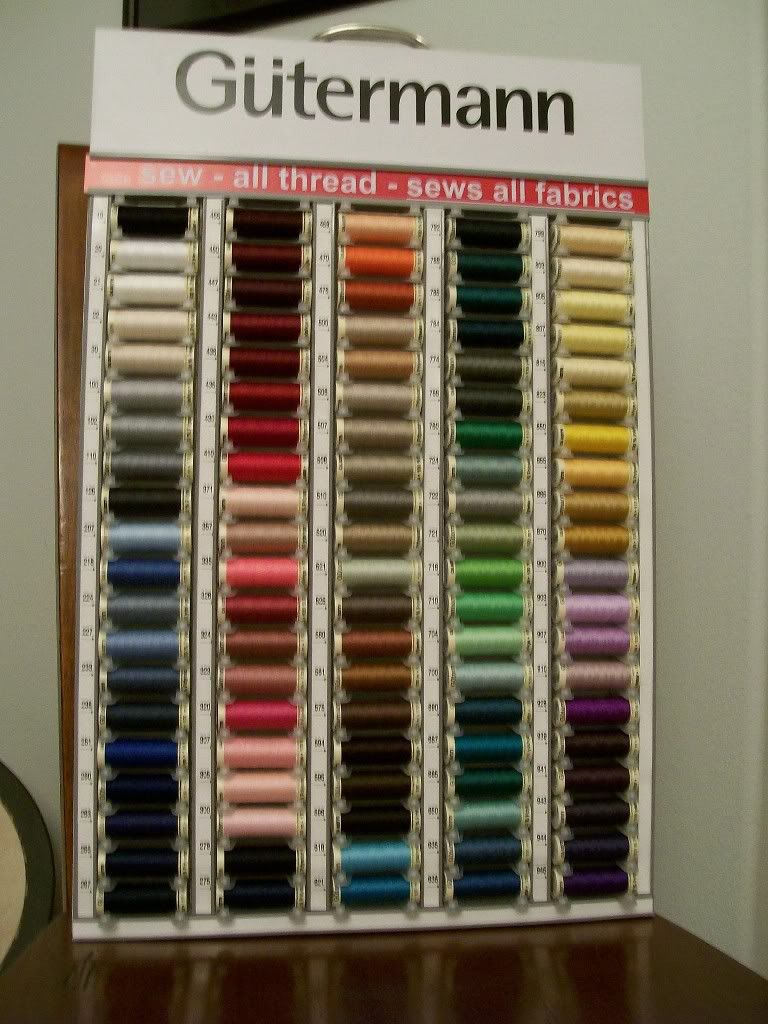 I love shopping in the fabric store on a sale day. I found some great batiks, a couple of terrific gifts for my guild friends, and three neat new sewing concept books, all at 40%-50% off. Once I'd finished shopping for the stuff I want I gave into the impulse and went back to confirm that all the thread cabinets were gone, and they were . . . except one. There was actually one left.
I had to touch it to be sure I wasn't hallucinating. I was so sure it couldn't be the right cabinet that I looked in my sales circular to make sure its product number matched the sale listing. That was when I noticed that until noon my 20% off coupon was good for both regular- and sale-priced items. I hadn't seen the fine print earlier.
I put the very last cabinet of Gütermann thread in my basket, marched right up to the front cashier, and paid for it. It cost me $64.00, almost $100.00 off the regular price. While I was paying the cashier, I wondered how I'd feel right then if I'd bought it six months ago for full price. Stupid and angry for jumping at something I wanted badly but knew cost too much. Who wouldn't? But I knew I'd also waited almost too long to get the thread, too -- it was only pure dumb luck that someone else hadn't snatched it up before I found it.
I know it's just thread, and by this time next year most of it will be used up in various sewing projects. But for the next twelve months, I will grin every time I go to my sewing table and see that lovely cabinet hanging on my wall. It's still the best there is, but it's even more precious to me now because I waited long enough to get it on my terms, plus I happened to be in the right place at the exact right time to land this deal -- a really wonderful deal at that.
What has this to do with writing professionally? Think about it.
I have long been a fan of Gütermann threads.When you sew as much as I do, you go through hundreds of spools of thread every year. Quilters are especially fussy, and when we find a brand that works for us we become very loyal to it. I've tried just about every other brand, and found that everything Gütermann makes, from silk to glace-hand quilting threads, are the best on the market.
Gütermann's threads can also be quite expensive; often costing three times more than the standard stuff, so I only buy what I need for a particular project. I save any leftover thread for repair work and only keep about a dozen spools with common colors in my sewing basket, so I never have much on hand.
I was at my fabric store about six months ago when I saw an end cap with six big numbered racks of Gütermann thread, and thought they were just shipments the clerks had parked there until they had time to put them out on the bigger racks. Closer examination revealed the cabinets were actually for sale -- 100 spools in all the best colors for $160.00.
I almost bought it right there, but my conscience kicked in, and I forced myself to walk away. $160.00 for thread was not in my sewing budget, even though I knew I had the money and I'd use every spool. I have a sewing budget for the same reason I have a writing budget -- if I didn't, my spending would quickly spiral out of control. I could buy cheaper thread and still get the job done, but something told me to wait and see if I could get the Gütermann on sale.
The next time I went to the store, someone had bought one cabinet, leaving five on the end cap. It made me feel a little flutter of panic; there are a lot of home sewers in my area and they aren't dummies. On that trip I had a 20% off one regularly-priced item coupon, which meant I could buy one of the cabinets for $128.00. Much better, but still too pricey for my budget. I stood there trying to make bargains with myself, but the budget would not be budged, and I had to walk away again.
Because they were expensive, the cabinets sold slowly. I know because I checked them every time I went to see if they went on sale. They never did. By the first week of November there were only three left, and when I asked the store clerk said they wouldn't be stocking them after the last three went. That almost convinced me to buy them with my next 20% off coupon, but it was time for my sewing machine to be serviced, and most of the sewing budget had to go toward that. Again I walked away, completely depressed and absolutely sure the next time I came back the last of the cabinets would be gone, and I'd have missed my chance to have 100 spools of that lovely thread.
Fast forward to this past weekend. I never go shopping on Black Friday, but if there are some good Saturday sales I will venture out on the holiday weekend. My fabric store circular came, and on page two listed the Saturday doorbusters. Among them was my much-coveted Gütermann thread cabinet for 50% off if it was purchased before noon.
50% = $80.00.
I hadn't been to the fabric store in over a month, so I didn't rush. I just knew with my luck that if there were still any cabinets left, they'd be snapped up the minute the doors opened. So I had a leisurely morning and went out around 9:30 am to pick up some fabric, notions and gifts I needed.
I love shopping in the fabric store on a sale day. I found some great batiks, a couple of terrific gifts for my guild friends, and three neat new sewing concept books, all at 40%-50% off. Once I'd finished shopping for the stuff I want I gave into the impulse and went back to confirm that all the thread cabinets were gone, and they were . . . except one. There was actually one left. I had to touch it to be sure I wasn't hallucinating. I was so sure it couldn't be the right cabinet that I looked in my sales circular to make sure its product number matched the sale listing. That was when I noticed that until noon my 20% off coupon was good for both regular- and sale-priced items. I hadn't seen the fine print earlier.
I put the very last cabinet of Gütermann thread in my basket, marched right up to the front cashier, and paid for it. It cost me $64.00, almost $100.00 off the regular price. While I was paying the cashier, I wondered how I'd feel right then if I'd bought it six months ago for full price. Stupid and angry for jumping at something I wanted badly but knew cost too much. Who wouldn't? But I knew I'd also waited almost too long to get the thread, too -- it was only pure dumb luck that someone else hadn't snatched it up before I found it.
I know it's just thread, and by this time next year most of it will be used up in various sewing projects. But for the next twelve months, I will grin every time I go to my sewing table and see that lovely cabinet hanging on my wall. It's still the best there is, but it's even more precious to me now because I waited long enough to get it on my terms, plus I happened to be in the right place at the exact right time to land this deal -- a really wonderful deal at that.
What has this to do with writing professionally? Think about it.
Saturday, November 28, 2009
The Last NaNoPost


One day a Japanese art student became bored during his university exams and decided to fool around with some paper. Four years later he finished constructing this incredible model city, made entirely out of two things: paper and craft glue.
The construct, named "Castle on the Ocean" by the artist, is roughly 8' X 6' and stands about 3' tall. It features a castle based loosely on El Temple de la Sagrada Familia in Barcelona, Spain (the same church that I discovered has doors made of words) as well as a cathedral, a school, a factory, a theme park and an airport. It also comes with electric lights and a train that moves.
No one can deny how magnificent this paper city is. But here's the kicker: after the exhibit the creator plans to set the whole thing on fire and burn it down.
Yep. You heard me. The artist spent 1,460 days building this magnificent construct so that he could torch it.

While I acknowledge that Watura Ito has every right to set fire to his paper city (and I've torched enough of my own work to understand the compulsion) I wish I knew Japanese and his phone number, so I could call and talk him out of it (this is assuming he hadn't already burned it.) This isn't just some bored student's art project. This is incredible, and gorgeous, and makes my heart hurt just to look at it. This is what I consider the only real magic in the world.
How hard can it be to find one art student on the other side of the planet, and what is the Japanese for "Dude, have you lost your mind?"
Over the last month you NaNo'ers have been building your paper cities, and while they don't resemble this gorgeous construct anywhere except maybe in your head, like Mr. Ito's art they are the product of thought and imagination and a lot of effort. What's cool about yours is the possibility that someday, when I or someone else reads the end result of that five pound stack of used bond paper, you're going to take us on a personal, guided tour of your city, and we'll never have to leave our homes. You'll introduce us to the people who live there, and show us what's happening, and laugh and cry and yell along with us as we explore it. We might even come back once or twice or thirty times to do it all over again with you. We might tell our friends about it, and they'll tell friends, and they'll tell friends . . .

Unless you don't finish your paper city. Or you do, but then you decide to box it up, stick it on a shelf, or drop it in the back of a drawer. Or you just park it on your hard drive and forget about it. What's the difference between doing that with your novel and setting fire to it? Well, if you burn it, you might have enough time to roast a marshmallow or two and make a s'mores. That's about it.
I know what you're thinking. Oh, yeah. I'm not psychic. I've been there, and it's probably some variation of this: My paper city sucks. I didn't build it right. It's not as good as [insert title of your favorite book.] No one will want to look at it. I hate it. Why waste my time and humiliate myself by showing it to anyone? It's better if I just forget about the whole thing.
It's not better. It's giving up. You just spent an entire month building a city and you're going to set fire to it before anyone even gets a glimpse. Ever hear of an exercise in futility? What you're thinking about doing is the definition.
Your paper city may not be finished, and may require another month or two or six or even a year of work to complete. So finish it. It may not be fabulous, or exciting, or even resemble a city. So edit it and make it right, or start over and build a new city. What you construct might never be as good as your favorite author's book. So build and submit it anyway. Because if you don't build and finish and edit and submit, you'll never know if you could have made something magical for the rest of us. You won't learn if it really didn't work, or anything useful from the mistakes you made. You'll just be the proud owner of a stack of printed paper gathering dust, like a million other writers who were too afraid to try.
Look at this one more time:
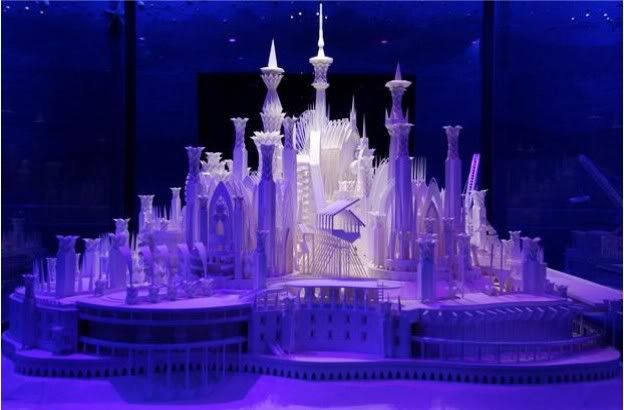
This is what is waiting for you. Not everyone can build it, and it's hard work simply to become skilled enough at your art to get to this level. You have to study and practice and fail a bunch of times. You have sacrifice things in order to build, and those things are usually a lot less work and much more fun. You'll be made to pay for what you build in a thousand different inventively painful ways. You might even build every day for the rest of your life and never do anything as incredible as this paper city, or if you do, you might never be given the chance to show it to the rest of the world.
This is why I completely understand if you'd rather do anything else than this gig, and I mean that sincerely.
But if this is who you are, if this is what you do, then know that we're waiting for you to show us your castles. We want you to guide us through your cities. Don't tear down your construct because you're afraid. If you do you're not just giving up on yourself, you're giving up on us, and we need your magic in our lives.
Thanks to everyone who has come to PBW all month to join in and offer encouragement (you illuminated my November city and made the job quite a bit easier) and congratulations to everyone who has participated in NaNoWriMo. Whether you finish by the 30th or not, you've done something amazing. I hope you keep making the magic real.
Related Links:
Telegraph.co.uk's photo gallery of Wataru Ito's Castle on the Ocean.
How the lighting of the paper city was accomplished.
Friday, November 27, 2009
Best Viewed with Curiosity
I'm off to read, bake cookies, have friends over and otherwise not step one foot out of the house (my guy is in retail, so I expect him to drag himself home sometime around 1 am.) I hope your holidays are going well.
So that your visit here was not entirely wasted, here are:
Ten Links from Leogeo.com
(caution: most of these links come with music or sound effects, so turn off your speakers if you're at work)
Day and Night
E-Site Study
Encircling Circles
Green
Harlequin (one that won't piss you off)
On the window
RGB
Round-round
Time
Time beat
Leogeo.com is the online art studio/journal/experiment/poetry/you name it of Leo Mariño in Barcelona, Spain; (Leogeo.com Version 1 is equally as cool.
So that your visit here was not entirely wasted, here are:
Ten Links from Leogeo.com
(caution: most of these links come with music or sound effects, so turn off your speakers if you're at work)
Day and Night
E-Site Study
Encircling Circles
Green
Harlequin (one that won't piss you off)
On the window
RGB
Round-round
Time
Time beat
Leogeo.com is the online art studio/journal/experiment/poetry/you name it of Leo Mariño in Barcelona, Spain; (Leogeo.com Version 1 is equally as cool.
Thursday, November 26, 2009
Wednesday, November 25, 2009
Mid-week NaNoPost
Including today, you NaNo'ers out there have almost a week left to work on your novel. Of course there's also a holiday tomorrow for those who celebrate Thanksgiving, the holiday weekend that follows, and assorted celebrations, visitations, possibly traveling . . . plenty to do, and to derail you during this last stretch.
I'll tell you a professional secret: there's always the possibility of something to derail you. Holidays, domestic crises, disappointments, arguments, family emergencies, equipment failure, power outtages, illness, tornadoes, hurricanes, floods -- and they all seem to happen at the worst moment, like right on the first day of a deadline week. Or on the last. Usually, on the last.
Here's another professional secret: whatever it is, don't sweat it. Deal with life, write when you can, and let the rest go until the situation improves and allows you more writing time. To do otherwise is like trying to juggle chainsaws. It's just not worth it.
That's not me saying give up. Doing this job is never about quitting, it's about making it a part of your life. Life is not going to stand still while you write, so you have to work it in. Sometimes you can do that, and sometimes you simply can't. You'd never give up watching television just because you got a flat tire on the way home from work and missed one episode of your favorite program, right? Same thing with writing.
I'll be back on Saturday with my NaNo wrap-up post. Until then, Happy Thanksgiving, and have a great weekend.
Tuesday, November 24, 2009
T-Day Prep Secrets
For Thanksgiving this year I bought our bird a week in advance because last year I learned that all the other home cooks in my town buy theirs a week in advance, leaving only 5- or 35-lb. turkeys for those of us who'd rather wait. If you did the same, thawing a frozen turkey by transferring it from the freezer to the fridge is still the ideal method. I was taught was to allow 24 hours thaw time in the fridge per 5 pounds of frozen meat; Butterball say 1 day per 4 pounds, and has an entire page here with info on how to thaw your bird safely.
We love baked apple anything, and I wanted a lighter dessert this year for Thanksgiving, so I'm going to try the puff-pastry apple strudel recipe in the December 2009 issue of Cooking Light. They don't have it posted online yet, but there's a similar recipe here on Pepperidge Farm's Puff Pasty site. If I can find my candy thermometer, I'm also going to try a recipe CL has in the holiday issue for popcorn brittle -- you use popcorn instead of nuts; I bet the kids will love it.
Before people start to e-mail, my recipe for no-brainer fudge is here.
My favorite holiday centerpiece is an edible one, and I usually make mine out of apples and nuts. But this year in deference to my daughter's braces I'm going to make one from white, red and concord grapes and some gold-wrapped chocolate coins. If it turns out well I'll post a pic of it on the photoblog.
Thanksgiving is my one old-fashioned full-blown all-out cooking day during the year, and friends who drop in to visit early before they go home for their feast often ask me what they can bring. I suggest donuts, coffee cake or a brunch item that can be served easily and immediately to my drop-in guests (including the ones who bring it.) These are great because I don't have to prepare them or make stove or oven space for them, and they provide a gathering point for everyone else, which keeps them out of the kitchen and my hair (I love you guys, but if you touch my crudites before the platter is finished again, I'm going to hurt you.)
If you have hungry little ones with nothing to do, you might set up a card table with the ingredients they'll need to assemble this fun fruit turkey either as a snack for themselves or as a dessert alternative.
For those of you who dread turkey disasters on the big day, Butterball also has their annual holiday Turkey Talk-Line open once again this year: 1-800-288-8372 qeekdays from 8 a.m. to 8 p.m. CST, or if the turkey isn't on fire you can also e-mail them at talkline@butterball.com.
Do you all have any special T-Day preps or tips you'd like to share? Let us know in comments.
We love baked apple anything, and I wanted a lighter dessert this year for Thanksgiving, so I'm going to try the puff-pastry apple strudel recipe in the December 2009 issue of Cooking Light. They don't have it posted online yet, but there's a similar recipe here on Pepperidge Farm's Puff Pasty site. If I can find my candy thermometer, I'm also going to try a recipe CL has in the holiday issue for popcorn brittle -- you use popcorn instead of nuts; I bet the kids will love it.
Before people start to e-mail, my recipe for no-brainer fudge is here.
My favorite holiday centerpiece is an edible one, and I usually make mine out of apples and nuts. But this year in deference to my daughter's braces I'm going to make one from white, red and concord grapes and some gold-wrapped chocolate coins. If it turns out well I'll post a pic of it on the photoblog.
Thanksgiving is my one old-fashioned full-blown all-out cooking day during the year, and friends who drop in to visit early before they go home for their feast often ask me what they can bring. I suggest donuts, coffee cake or a brunch item that can be served easily and immediately to my drop-in guests (including the ones who bring it.) These are great because I don't have to prepare them or make stove or oven space for them, and they provide a gathering point for everyone else, which keeps them out of the kitchen and my hair (I love you guys, but if you touch my crudites before the platter is finished again, I'm going to hurt you.)
If you have hungry little ones with nothing to do, you might set up a card table with the ingredients they'll need to assemble this fun fruit turkey either as a snack for themselves or as a dessert alternative.
For those of you who dread turkey disasters on the big day, Butterball also has their annual holiday Turkey Talk-Line open once again this year: 1-800-288-8372 qeekdays from 8 a.m. to 8 p.m. CST, or if the turkey isn't on fire you can also e-mail them at talkline@butterball.com.
Do you all have any special T-Day preps or tips you'd like to share? Let us know in comments.
Monday, November 23, 2009
For the Writer on Your List
Ten Things That Make Great Gifts for Writers
Books: We write them, we read them, we love them. There isn't a single book gift I've received that I haven't wallowed in during the holidays, especially when it's a surprise book. One year a friend of mine filled a stocking with a mug, some packets of hot chocolate mix and some new mystery paperbacks she thought just sounded cool; I discovered three authors (Harlan Coben, Linda Fairstein and Sue Grafton) I still read ($7.99 for most new paperbacks; B&N.com has free shipping for orders of $10.00 or more for their members)
Bookseller Online Gift Certificates: Hands down the most painless for you/most welcome for them gift for any writer on your list. You purchase and e-mail it to them and you're done (B&N.com offers them in amounts ranging from $10.00 - $250.00)
Healthy Cooking X 2: Cooking Light Magazine is offering a 2-for-1 holiday gift subscription where you get 1 year/12 issues for your writer plus a second subscription for you. ($24.00 = $12.00/subscription)
Just for Journaling: For the writer who doesn't put everything on their blog, Vera Bradley Frankly Scarlet Flexi 6" X 8" Journal has 160 lined/lightly decorated pages and a closure band ($10.36/$9.32 for B&N.com members)
Levengers: With a catalogue writers and readers have been known to drool over, and some very dreamy but extremely expensive items, Levengers is definitely dangerous. But they also have a sales section that usually has some decent buys under $25, like this Notable Impressions Notebook and a colorful collection of Wordsmith's Rubber Bands and Clips, each marked down to $9.95 (various prices)
MagPo: I absolutely love Magnetic Poetry, and there are all kinds of editions for everyone on your list (most are $19.95.) For writers I like to give the Writer's Remedy ($14.95) or The Poet Edition ($19.95.) I admit, the one I still play with most is the little kit in the back of The Magnetic Poetry Book of Poetry ($13.95/$11.92 for members at B&N.com)
P&W: It might be stuffy at times -- okay, most of the time -- but the monthly, extensive listings of contests, open calls, grants and other writer sub ops make the print version of Poets & Writers magazine worth the annual subscription rate (currently $14.97/six issues)
Shakespeare's Den: For those classic lit-lovers and calligraphy nuts on your list, I recommend having a look around the unique offerings over at Shakespeare's Den. They always have some cool stuff in the sales and clearance section; I like this stylus and nib set for a very reasonable $9.95 and this very unusual musician's writing set for $19.95 (various prices)
Smithsonian Online: The virtual gift shop of the Smithsonian Museum is where I go when I need a gift for a hard-to-shop-for writer. Like Levengers they can be very pricey, but they run weekly web specials during the holidays and have a decent selection of gifts under $25.00. Two that appealed to me are a set of six Cloisonné pens for $24.00, a set of six Cloisonné kitten bookmarks for $15.99, and a calligraphy letter holder for $14.99 (various prices)
Thesaurus & Art: Thinkmap's Visual Thesaurus is one of my favorite gifts to give to writers; they offer a free 14-day trial if you want to test drive it first, and they also have a couple of subscription options, including online access on a monthly basis, which you can cancel at any time ($2.95 per month as you go, $19.95 for an annual subscription, and $39.95 for CDs for the software.)
Have you guys found any great gifts for writers or readers out there? Tell us about them in comments.
Books: We write them, we read them, we love them. There isn't a single book gift I've received that I haven't wallowed in during the holidays, especially when it's a surprise book. One year a friend of mine filled a stocking with a mug, some packets of hot chocolate mix and some new mystery paperbacks she thought just sounded cool; I discovered three authors (Harlan Coben, Linda Fairstein and Sue Grafton) I still read ($7.99 for most new paperbacks; B&N.com has free shipping for orders of $10.00 or more for their members)
Bookseller Online Gift Certificates: Hands down the most painless for you/most welcome for them gift for any writer on your list. You purchase and e-mail it to them and you're done (B&N.com offers them in amounts ranging from $10.00 - $250.00)
Healthy Cooking X 2: Cooking Light Magazine is offering a 2-for-1 holiday gift subscription where you get 1 year/12 issues for your writer plus a second subscription for you. ($24.00 = $12.00/subscription)
Just for Journaling: For the writer who doesn't put everything on their blog, Vera Bradley Frankly Scarlet Flexi 6" X 8" Journal has 160 lined/lightly decorated pages and a closure band ($10.36/$9.32 for B&N.com members)
Levengers: With a catalogue writers and readers have been known to drool over, and some very dreamy but extremely expensive items, Levengers is definitely dangerous. But they also have a sales section that usually has some decent buys under $25, like this Notable Impressions Notebook and a colorful collection of Wordsmith's Rubber Bands and Clips, each marked down to $9.95 (various prices)
MagPo: I absolutely love Magnetic Poetry, and there are all kinds of editions for everyone on your list (most are $19.95.) For writers I like to give the Writer's Remedy ($14.95) or The Poet Edition ($19.95.) I admit, the one I still play with most is the little kit in the back of The Magnetic Poetry Book of Poetry ($13.95/$11.92 for members at B&N.com)
P&W: It might be stuffy at times -- okay, most of the time -- but the monthly, extensive listings of contests, open calls, grants and other writer sub ops make the print version of Poets & Writers magazine worth the annual subscription rate (currently $14.97/six issues)
Shakespeare's Den: For those classic lit-lovers and calligraphy nuts on your list, I recommend having a look around the unique offerings over at Shakespeare's Den. They always have some cool stuff in the sales and clearance section; I like this stylus and nib set for a very reasonable $9.95 and this very unusual musician's writing set for $19.95 (various prices)
Smithsonian Online: The virtual gift shop of the Smithsonian Museum is where I go when I need a gift for a hard-to-shop-for writer. Like Levengers they can be very pricey, but they run weekly web specials during the holidays and have a decent selection of gifts under $25.00. Two that appealed to me are a set of six Cloisonné pens for $24.00, a set of six Cloisonné kitten bookmarks for $15.99, and a calligraphy letter holder for $14.99 (various prices)
Thesaurus & Art: Thinkmap's Visual Thesaurus is one of my favorite gifts to give to writers; they offer a free 14-day trial if you want to test drive it first, and they also have a couple of subscription options, including online access on a monthly basis, which you can cancel at any time ($2.95 per month as you go, $19.95 for an annual subscription, and $39.95 for CDs for the software.)
Have you guys found any great gifts for writers or readers out there? Tell us about them in comments.
Sunday, November 22, 2009
New Moon
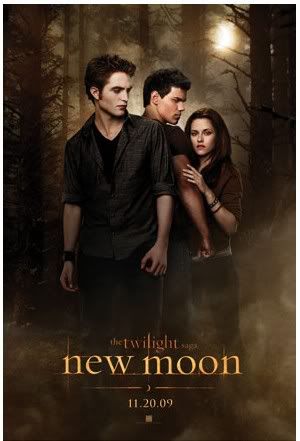 The kids and I went on Saturday to see New Moon, mainly to avoid all the crazed Twilight fans who packed the theaters for the Thursday midnight and Friday shows. Still, the show we planned to see was sold out when we arrived (15 minutes before start time; traffic on the way there was really heavy) so we bought tickets for the next show and went and had a leisurely lunch.
 When we came back for our show, they sent us to the largest stadium-style theater, and it was packed to the rafters. I actually had to sit in the row behind the kids because we couldn't find enough empty seats together. I'm going to do this again, too, because while I could keep an eye on them from where I was, I didn't have to put up with trying to watch the movie amidst a thousand giggles, whispers and Omigods from the girls.
Some potential spoilers follow; you have been warned.
Overall I thought the movie was okay, and stayed pretty faithful to the novel, although I only read New Moon once so don't quote me on that. I liked the characters of Jacob and Carlisle best, and they both made the movie for me. The filming was beautifully done, with plenty of interesting angles and special effects -- and please note, computer-generated stuff never bothers me because I'm too old and near-sighted to tell if it's real or it's digital; your mileage may vary.
I still didn't like a few things that were carried over from Twilight, like the weird vampire makeup and the odd-colored contacts they wear. I wish Emmet would get more lines and screen time; he's fun. The scenes with Victoria running through the forest were a waste of film. Most annoying/overdone detail: there were so many audible gasps and other breathing sounds from Bella's character I felt like I should be yelling for a rescue inhaler every time she came on screen.
The violence wasn't too over-the-top, but there seemed to be a great deal more of it in this movie compared to Twilight (it's been a while since I saw the first movie, though, so I may have forgotten it.) I saw a lot of very young kids in the theater, and personally I'd be very hesitant to bring a child under the age of 13 to see this movie.
Some other thoughts:
If you're going this week, buy your tickets in advance and get there early to see what sort of lines you'll be dealing with. The show after ours had at least three hundred people waiting in line by the time we came out.
New Moon is a long movie, clocking in at 2 hours 10 minutes, so definitely hit the restroom before it starts and don't drink a vat of soda during the film.
Having a healthy lunch immediately before the movie provided an unexpected bonus; no one wanted the movie theater's very unhealthy popcorn, candy or sodas when we went back for our show. Probably saved me at least $40.
You might consider pre-screening the movie yourself before you bring kids who are easily impressionable or under the age of 13 for a couple of reasons:
-- The romantic content remains hugging and light kissing only, but there is definitely more of that, and a building adult theme to the relationship between the protagonists.
-- The werewolves are not of the drippy or gross variety, and the transformations are almost instantaneous so you don't even catch it if you blink, but there are several group attack scenes and one battle between two werewolves that might frighten a little one.
--There was also a lot more implied/offstage violence, as when they lead a large group of unsuspecting tourists (including a small child) in to the Italian vampires. You don't see anything, but you do hear screams begin and none of the heroic characters do anything to intervene.
-- I thought the most graphic scene was one that showed a before-and-after manual decapitation of one vampire by another. It wasn't bloody or extended, but it was brutal and disturbing.
My two hardcore Twilight fans said it was better and much more exciting than the first movie. So it made the kids happy, although the girls were completely on the edge of their seats during the very last scene, which ends on another Bella gasp. After that both girls swore they'd have to be first in line to see the next movie, which means we'll be doing this again in June 2010, when Eclipse hits the theaters.
Saturday, November 21, 2009
EndWeek NaNoPost
I'm hoping by the time this post shows up on the blog that I've completed 50K and made my NaNoWriMo goal. But if I haven't, I'm sure you'll forgive me; we've still got nine days left.
This past week for me has been all about striking back. I got over a major disruption and took back my writing space. Every time I sat down to work it felt like victory, as if I'd taken back my Road Runner lunchbox from a schoolyard bully. Life can interrupt and shout and hit and stomp you, but at the end of the day if you really want that PB&J, you have take it back and say "Mine."
The last week of NaNoWriMo will be a bit like a deadline week is for a pro. You may become painfully aware of time, or see November 30th bearing down on you like a train without brakes. Panic can set in, and so can the urge to have multiple marathon writing sessions. Just the other day I caught myself doing the math in my head to see how much I'd have to write per day to finish the entire book by November 30th (about 5.4K, or eight hours of writing sessions per day, which is doable -- but I'd have to set aside all my other WIPs to do it.)
If you've fallen behind, I'm not going to tell you to give up on your goal. Some things are worth a couple of marathon writing sessions. Just be smart and try to pace yourself, take regular breaks and don't do a wordcount every five minutes.
If you're on schedule or you're in the home stretch, don't rush things to finish early -- keep up a steady pace. One thing most pros do is learn how to take advantage of time and make the best use of it versus forever trying to beat the clock. There are no prizes for the fastest writer, or the most prolific.
At this point whether you have 10K, 20K, 30K, or 49.9K, you may also have another visitation from the Ghost of Doubts and Fears Past. They like to drop in around now to remind you of how much you suck, and there's nothing they like better than to derail a writer who is coming within sight of their goal. I think they have prizes for that; little shrunken writer heads that they put on necklaces and wear around their scrawny necks.
If those old feelings get into your writing space, remember what you have to do: accept them, agree with them, and then write your words for the day. Don't waste your time and energy wrestling with invisible jackasses who only want to suck the life and joy out of your work and your skull.
So how are you NaNo'ers out there doing? Has anyone won, or gotten close to the finish line? Let us know in comments.
Friday, November 20, 2009
No-Cost Ten
Ten Things You Can Have for Nothing
Freeware caution: always scan free downloads of anything for bugs and other threats before dumping the programs into your hard drive.
ALEX Personal Knowledge Base is "a very simple tool to organize your knowledge, notes, ideas and other information" (OS: Windows32/64, Linux32/64, OS X, Solaris, AIX and etc.)
Eldy is "the first easy software dedicated to the elderly, from European Eldy’s non-profit organization. Eldy allows seniors use computers and enjoy the Internet revolution, by providing a software that allows easy access to all the most important functions: e-mail (any pop3/imap account), chat, Web browsing, weather, text editor, streaming and a lot more." [I'm listing this one for writers out there like me with older parents who are often perplexed by Internet; this might make things a bit easier for Mom & Pop.] (OS: Windows and Linux; multi-lingual, multi-user version available.)
FotoMix is "a versatile program that allows you to mix and manipulate different pictures, to create a wide variety of images. Features: Remove, add or alter backgrounds; add or remove your loved and not so loved ones from your pictures; design eye-catching photo collages, illustrations, wallpapers, CD and DVD covers, and miscellaneous Web graphics; create photo montages by combining multiple pictures into a unique heirloom depicting retrospectives of a birth, marriage, anniversary, etc." (OS: Windows 2000/XP/Vista/7)
Idea Knot for Mac allows the user to "Quickly tie ideas together. That is what Idea Knot does. With it you write documents that contain ideas written quickly at the instant inspiration hits you. You then organize these ideas together into relevant groups. Finally, when you have more time, you can edit those ideas until they are complete. Freeware for Mac OS X only. Source code posted on developer's site. We use it internally to develop drafts for legal documents, use-cases for software development and brainstorming documents during meetings" (OS: Mac OS X)
Image Tricks is "an application to edit and generate images. It uses Mac OS X Core Image filters that transform pictures to unimaginable extent. Various mathematical algorithms let you generate unique images. Created artwork can be used as a background, web-design illustration, for print materials and more" (OS: Mac OS X 10.5 Intel, Mac OS X 10.4 Intel, Mac OS X 10.5 PPC, Mac OS X 10.4, Mac OS X 10.6, Mac OS X 10.6 Intel, Mac OS X 10.4 PPC)
iSnip is "a new freeware application that allows users to manage and edit a collection of text clippings that can be easily accessed from a system wide menu. iSnip includes the ability to create a snippet from the clipboard contents using a global hotkey, inserting or copying of the selected snippet, instant filtering of your snippet collection, full drag and drop organization, full rule-based organization (with wildcard support), integrated software updating, import and export of the users snippet database, and more" (OS: Mac OS X 10.3, Mac OS X 10.3.9)
Read your Kindle books on your PC with this free Kindle app (OS: Windows 7, Vista and XP; Mac version coming soon.)
OneLoupe is a screen magnifier that is "simple and easy to use, the small Magnifier is always ready when you need it to view all fine details, even the small print in the I-Net to decipher. OneLoupe is very practical and user-friendly. And it is virtually no burden on the system, an installation is not required. Once placed on the desktop, it is always ready for use. Adjustable zoom range, and the zoom factor allow an individual adapt to the needs of individuals. This will of course be saved for the next start of OneLoupe with your favourite settings. Get color pixel from your desktop screen is also implemented, and not to forget that it offers the possibility for the quick creation of images from the zoom range, for comfortable work over the clipboard. It is also suitable for people with visual impairments or weak eyes. The control of the zoom window is done through direct input of the keyboard and mouse motions" (OS: Windows Servers 2000/2003/2005 Win 98/XP/Vista and Windows-7 x64/x86)
"Part scrapbook, part “to-do” list (or to-buy list), Ript mimics the actions of ripping, piling and arranging scraps of information. If you can see it on your computer, you can “rip” it. Simply drag and drop images and text from the internet or your computer and arrange them however you please — making it easy to compile, print and share your handiwork" (OS: Windows XP and Vista)
Text to HTML Converter is "a free tool for plain text to html conversion. To convert your text file to html -- just open the text file and press "convert" button" (OS: Windows)
Last minute extra: want to read a novel by an award-winning writer as it's being written? Author Holly Lisle is giving away the first draft of her new novel, TalysMana, to readers by e-mail. There's no cost involved, you just have to sign up by name and e-mail here, and you'll receive the book one scene at a time as she writes it.
Freeware caution: always scan free downloads of anything for bugs and other threats before dumping the programs into your hard drive.
ALEX Personal Knowledge Base is "a very simple tool to organize your knowledge, notes, ideas and other information" (OS: Windows32/64, Linux32/64, OS X, Solaris, AIX and etc.)
Eldy is "the first easy software dedicated to the elderly, from European Eldy’s non-profit organization. Eldy allows seniors use computers and enjoy the Internet revolution, by providing a software that allows easy access to all the most important functions: e-mail (any pop3/imap account), chat, Web browsing, weather, text editor, streaming and a lot more." [I'm listing this one for writers out there like me with older parents who are often perplexed by Internet; this might make things a bit easier for Mom & Pop.] (OS: Windows and Linux; multi-lingual, multi-user version available.)
FotoMix is "a versatile program that allows you to mix and manipulate different pictures, to create a wide variety of images. Features: Remove, add or alter backgrounds; add or remove your loved and not so loved ones from your pictures; design eye-catching photo collages, illustrations, wallpapers, CD and DVD covers, and miscellaneous Web graphics; create photo montages by combining multiple pictures into a unique heirloom depicting retrospectives of a birth, marriage, anniversary, etc." (OS: Windows 2000/XP/Vista/7)
Idea Knot for Mac allows the user to "Quickly tie ideas together. That is what Idea Knot does. With it you write documents that contain ideas written quickly at the instant inspiration hits you. You then organize these ideas together into relevant groups. Finally, when you have more time, you can edit those ideas until they are complete. Freeware for Mac OS X only. Source code posted on developer's site. We use it internally to develop drafts for legal documents, use-cases for software development and brainstorming documents during meetings" (OS: Mac OS X)
Image Tricks is "an application to edit and generate images. It uses Mac OS X Core Image filters that transform pictures to unimaginable extent. Various mathematical algorithms let you generate unique images. Created artwork can be used as a background, web-design illustration, for print materials and more" (OS: Mac OS X 10.5 Intel, Mac OS X 10.4 Intel, Mac OS X 10.5 PPC, Mac OS X 10.4, Mac OS X 10.6, Mac OS X 10.6 Intel, Mac OS X 10.4 PPC)
iSnip is "a new freeware application that allows users to manage and edit a collection of text clippings that can be easily accessed from a system wide menu. iSnip includes the ability to create a snippet from the clipboard contents using a global hotkey, inserting or copying of the selected snippet, instant filtering of your snippet collection, full drag and drop organization, full rule-based organization (with wildcard support), integrated software updating, import and export of the users snippet database, and more" (OS: Mac OS X 10.3, Mac OS X 10.3.9)
Read your Kindle books on your PC with this free Kindle app (OS: Windows 7, Vista and XP; Mac version coming soon.)
OneLoupe is a screen magnifier that is "simple and easy to use, the small Magnifier is always ready when you need it to view all fine details, even the small print in the I-Net to decipher. OneLoupe is very practical and user-friendly. And it is virtually no burden on the system, an installation is not required. Once placed on the desktop, it is always ready for use. Adjustable zoom range, and the zoom factor allow an individual adapt to the needs of individuals. This will of course be saved for the next start of OneLoupe with your favourite settings. Get color pixel from your desktop screen is also implemented, and not to forget that it offers the possibility for the quick creation of images from the zoom range, for comfortable work over the clipboard. It is also suitable for people with visual impairments or weak eyes. The control of the zoom window is done through direct input of the keyboard and mouse motions" (OS: Windows Servers 2000/2003/2005 Win 98/XP/Vista and Windows-7 x64/x86)
"Part scrapbook, part “to-do” list (or to-buy list), Ript mimics the actions of ripping, piling and arranging scraps of information. If you can see it on your computer, you can “rip” it. Simply drag and drop images and text from the internet or your computer and arrange them however you please — making it easy to compile, print and share your handiwork" (OS: Windows XP and Vista)
Text to HTML Converter is "a free tool for plain text to html conversion. To convert your text file to html -- just open the text file and press "convert" button" (OS: Windows)
Last minute extra: want to read a novel by an award-winning writer as it's being written? Author Holly Lisle is giving away the first draft of her new novel, TalysMana, to readers by e-mail. There's no cost involved, you just have to sign up by name and e-mail here, and you'll receive the book one scene at a time as she writes it.
Thursday, November 19, 2009
Newsy Bits
NY Time bestselling author Bob Mayer has joined the line-up over at my group blog, Genreality, and his first post is already up.
Google has this image search thing called Image Swirl that is currently in demo stage, but looks pretty neat; evidently it's set up to operate a bit like ThinkMap's Visual Thesaurus (link swiped from The Presurfer.)
I'm going to be doing some blog renovations during the month of December, when I'll also be wrapping up my 2009 online art project, PBWindow. While I won't be posting every day after 12/31/09, I am going to keep the photoblog and post to it whenever I have something interesting or fun to share.
Anyone besides me and the kids going to see New Moon this weekend?
Google has this image search thing called Image Swirl that is currently in demo stage, but looks pretty neat; evidently it's set up to operate a bit like ThinkMap's Visual Thesaurus (link swiped from The Presurfer.)
I'm going to be doing some blog renovations during the month of December, when I'll also be wrapping up my 2009 online art project, PBWindow. While I won't be posting every day after 12/31/09, I am going to keep the photoblog and post to it whenever I have something interesting or fun to share.
Anyone besides me and the kids going to see New Moon this weekend?
Wednesday, November 18, 2009
Mid-week NaNoPost
We've passed the mid-way mark of NaNoWriMo, and I really felt the burn this past week. The words were not interested in me or my novel and tried to avoid me. All the fun went out of town. I got mired down in scene after scene and slogged, slogged, slogged. If there was an Olympic slogging event, I think I would have qualified five times over.
A couple of times my mercenary self (a bit like TssVar from StarDoc, but with more teeth) tried to reason with my writer self (a lot like an exhausted hamster lolling in a wheel, with less teeth.) The money-hungry lizard self kept asking, "Why keep doing this when we could be 100% focused on the stuff we do for money?" My little fuzzy squeaky self was smart, though, and hid under the bed until my mercenary self got tired of poking at the dust pellets and slithered off to balance the checkbook and conquer some helpless planet.
If you writers out there are where I was, this is a wonderful time to laugh at yourself. Writers are never as funny as we are when we're frustrated. We do crazy stuff, we say ridiculous things, and occasionally we find inspiration in the most unlikely of places.
To cope with this slog-fest I've been stuck in, I went to see the same play twice in two days, made myself fish for breakfast (after everyone left the house) and cleaned out my laundry room (you could now comfortably dine on any surface in there, including the ones inside the machines.) I also worried and fretted and meditated and wore my ugliest pair of socks and at one point considered stopping by a tattoo parlor (fortunately that last impulse was defeated by the memory of my mother's life long threat to chop off any part of my body that I ever have tattooed.)
Writing is glorious. It's also heart-breaking. But somewhere in the middle it can get a little ridiculous, too. So can we. In those times, the best medicine is laughter, directed at yourself, at this rather insane calling of ours, and at everything we do to cope with it.
The highlight of this past week was when I shut off the computer, went into the kitchen and baked a big batch of cookies that I really didn't have time to bake. It reminded me that spending time doing something frivolous and unnecessary, just for the joy of it, is always a good thing. Kind of like NaNoWriMo . . .
Tuesday, November 17, 2009
Snow and Trees

In addition to my NaNoNovel, I'm working on the third Kyndred book, and one major obstacle I have with this one is the setting for one of the early chapters of the novel: snow and trees, trees and snow. There are mountains (background) a road (lost early on) and one cargo truck (ditto) but that's about it. During the length of one chapter I have to move my characters through a setting in which there are no other people, vehicles, houses, towns or any sign of civilization.
This is the sort of place I think of as a non-setting setting, and it's one of the toughest to write because it seems like you have so little to work with. It's always tempting to start adding in things into this bleak landscape to remind the reader that the characters are still on this planet: critters (wild), caves (abandoned) and cabins (ditto) would be my first choices. But a magical distraction or solution to their immediate problem doesn't serve this story, so I have to work with what I have: snow and trees.
Fortunately I've visited several remote areas during winter, and I know I have a bit more than snow and trees to work with. There is the sky, various forms of natural light, water (streams, lakes, ponds) rock formations, animal tracks, and remnants of earlier passages (some hikers don't seem to know what trash cans are.)
Cold is always touted to mute the senses, and it does restrict my sense of smell, but I've found it also sharpens my hearing. You'd think a setting of snow and trees would be pretty silent, and it can be, but there's also the wind, snow falling, birds, echoes, etc. If you're in thaw weather, you hear water dripping, rushing, shifting debris and cracking as solid surfaces break up; if you're in a freeze you hear branches snapping, drifts collapsing and this odd crunchy sound ice-covered objects make when they rub together. In such places you also tend to regularly hear your own breathing and (occasionally) your heartbeat.
I find visuals help, too. I regularly go over and search Landscapes 2.0 for inspirational pics using keywords like mountains, snow and winter. Often photographers find things in otherwise deserted landscapes that are beautiful, poignant and even astonishing.
Once I put together all my visuals, notes and ideas, I found I had quite a bit more to work with than just snow and trees. But I'll admit, I'm glad it's only for one chapter. As much as I like snow and trees, I like great big fireplaces, warm snuggly quilts and huge steaming mugs of hot chocolate even better. So will my characters.
Related links:
How Setting Influences Story by J.C. Hewitt.
Fun with Setting by PBW.
Image credit: © Luminis | Dreamstime.com
Monday, November 16, 2009
NaNo Ten
Ten Things to Help with NaNoWriMo
Customize your anagrams with Wordsmith.org's Advanced Anagrams generator.
Over at the forums on the NaNoWriMo site I found the quite excellent Big Scary Character Quiz '09, which gives you a long list of questions to answer in character.
Another detailed character worksheet template: The Epiguide.com Fiction Writer's Character Chart.
For those who need to make maps and have GIMP, here's a neat step-by-step tutorial on how to do it.
If you want a common last name for your ordinary Joe, check out the Most Common Surnames in the U.S. using data from the 1990 census.
If you want to put up a simple progress meter on your blog or site, check out Writertopia's page on Writing Meters.
The Great American Novel by . . . Sky Halillee -- get a writing pseudonym that is an anagram of your real name (or anything you type in the box) over at Technologies du Langage here (enter the name or words you want anagramed in the box next to "Tapez sans accents.")
How many characters or words do you type per minute, and how many mistakes do you make? Find out with this online Typing Speed Test (warning, highly addictive.)
A nice collection of world-building links can be found at World Builder Projects.
Dr. Wicked's Write or Die is "a web application that encourages writing by punishing the tendency to avoid writing. Start typing in the box. As long as you keep typing, you're fine, but once you stop typing, you have a grace period of a certain number of seconds and then there are consequences." (I tried this in Kamimkaze/Strict moder and deliberately stopped writing to see what would happen. It flashed a few colors at me, then it began erasing what I'd already typed. That is wicked.)
All of the above links were found while rifling through at NaNoWriMo.org's Helpful Orgs and Site forum.
Customize your anagrams with Wordsmith.org's Advanced Anagrams generator.
Over at the forums on the NaNoWriMo site I found the quite excellent Big Scary Character Quiz '09, which gives you a long list of questions to answer in character.
Another detailed character worksheet template: The Epiguide.com Fiction Writer's Character Chart.
For those who need to make maps and have GIMP, here's a neat step-by-step tutorial on how to do it.
If you want a common last name for your ordinary Joe, check out the Most Common Surnames in the U.S. using data from the 1990 census.
If you want to put up a simple progress meter on your blog or site, check out Writertopia's page on Writing Meters.
The Great American Novel by . . . Sky Halillee -- get a writing pseudonym that is an anagram of your real name (or anything you type in the box) over at Technologies du Langage here (enter the name or words you want anagramed in the box next to "Tapez sans accents.")
How many characters or words do you type per minute, and how many mistakes do you make? Find out with this online Typing Speed Test (warning, highly addictive.)
A nice collection of world-building links can be found at World Builder Projects.
Dr. Wicked's Write or Die is "a web application that encourages writing by punishing the tendency to avoid writing. Start typing in the box. As long as you keep typing, you're fine, but once you stop typing, you have a grace period of a certain number of seconds and then there are consequences." (I tried this in Kamimkaze/Strict moder and deliberately stopped writing to see what would happen. It flashed a few colors at me, then it began erasing what I'd already typed. That is wicked.)
All of the above links were found while rifling through at NaNoWriMo.org's Helpful Orgs and Site forum.
Sunday, November 15, 2009
Off to Write & Deal
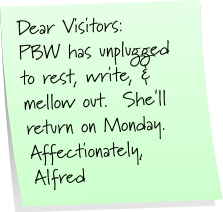
Create a sticky note online for your blog at Wigflip.com's sticky note generator, Superstickies (link swiped from Gerard over at The Generator Blog.)
Saturday, November 14, 2009
EndWeek NaNoPost
Since the midweek NaNoPost I've been dealing with things that don't belong in my writing space that I let get into my writing space. Why? Well, I had the best of intentions. It was important. I thought I could sort it out quickly and get back to work. And I didn't, not for two days, and it wrecked me and derailed the decent momentum I had going with the NaNoNovel.
People who are not writers often have very little idea of how much havoc they can create in the writing space. At times it's the equivalent of going to someone's workplace to empty a garbage can on their desk in front of their boss while shrieking obscenities at them. Kind of difficult to get back to being a happy, productive worker after someone subjects you to that.
So what do you do when someone intrudes and dumps their garbage in your writing space? I believe the writer has to first get them out of it. The next task is to clean up the mess they made and carry out the trash they left behind. Once the writing space is restored to optimum working conditions, the writer can then make peace with what happened and get back to work.
Easier said than done, I know. Sometimes you have to relocate your writing space, become very creative with handling other people's garbage, or even take some time away from work to clear your head, focus, and find a way back to where you were before this happened.
After an intrusion, I depend on meditation and work to reset my head and help me cope. It never happens fast enough to suit me, but I've also learned that pretending me and my writing space haven't been trashed doesn't work. I do know better than to stop writing, even when I have to work through days when I can't produce a single decent sentence. I write badly anyway. The very act of writing anything is quietly, enormously healing.
I'm hoping today that I get back on track. If not, I'll keep working until I do. I may not always guard my writing space as I should, but as long as I keep writing there, it will always be my sanctuary.
In case anyone is interested in seeing some excerpts from my NaNoNovel, I posted one at the groupblog last Saturday and another at the Stories blog today.
Friday, November 13, 2009
Dimensional Ten
Ten Free RPG Generators I Played with over at Dimensions Game Software
Sight: A thickening fog Sound: A whistle Taste: Bland Touch: Springy Smell: Inviting (The Ambience Generator)
"You hear rattling sounds." (The Automated GM)
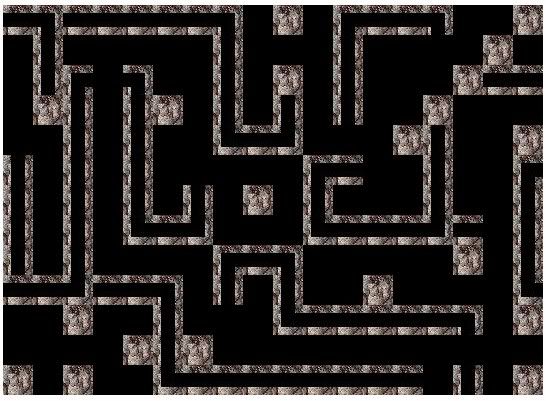 The Catacomb Generator
Rhapsodomancy: Divination by using random verses, passages, or words from the works of a great poet. (The Divination Generator)
Fern: Hart's tongue Flower: Gardenia Fungus: Bread mold Herb: Henbane Moss: Peat moss Tree: Cashew Grass: Buffalo Grass Shrub: Snowberry Vine: Ivy Weed: Bindweed (The Fantastic Flora Generator)
Name: Colm Origin: Gaelic Gender: Male Meaning: Dove (The Name Generator)
"The trees shall die before the desert shall stumble." (The Obscure Prophecy Generator)
Demeanor: Oblivious Hardship: Deaf Phobia/Mania: (None) Occupation: Doll maker (The Personality Generator)
chybblaerm ~ kralychaeg ~ laefdraz ~ mylyglah ~ wiemy (The Word Generator)
Number of Continents: 3 Number of Major Island Chains: 4 Number of Oceans: 6 Number of Moons: 2 Number of Suns: 3 [also generate continents, island chains, regions and more] (The Worldbuilder)
To check out more of Dimensions Game Software's free online RPG generators, head over to their RPG toolbox page and scroll down to the bottom.
Sight: A thickening fog Sound: A whistle Taste: Bland Touch: Springy Smell: Inviting (The Ambience Generator)
"You hear rattling sounds." (The Automated GM)
The Catacomb GeneratorRhapsodomancy: Divination by using random verses, passages, or words from the works of a great poet. (The Divination Generator)
Fern: Hart's tongue Flower: Gardenia Fungus: Bread mold Herb: Henbane Moss: Peat moss Tree: Cashew Grass: Buffalo Grass Shrub: Snowberry Vine: Ivy Weed: Bindweed (The Fantastic Flora Generator)
Name: Colm Origin: Gaelic Gender: Male Meaning: Dove (The Name Generator)
"The trees shall die before the desert shall stumble." (The Obscure Prophecy Generator)
Demeanor: Oblivious Hardship: Deaf Phobia/Mania: (None) Occupation: Doll maker (The Personality Generator)
chybblaerm ~ kralychaeg ~ laefdraz ~ mylyglah ~ wiemy (The Word Generator)
Number of Continents: 3 Number of Major Island Chains: 4 Number of Oceans: 6 Number of Moons: 2 Number of Suns: 3 [also generate continents, island chains, regions and more] (The Worldbuilder)
To check out more of Dimensions Game Software's free online RPG generators, head over to their RPG toolbox page and scroll down to the bottom.
Thursday, November 12, 2009
Hot Spots
I followed a link over on Gerard's Presurfer blog and found a new and very interesting online generator, described on the site as:
"Feng-GUI simulates human vision during the first 5 seconds of exposure to visuals, and creates heatmaps based on an algorithm that predicts what a real human would be most likely to look at. This offers designers, advertisers and creatives, a Pre-testing technology that predicts performance of an image, by analyzing levels of attention, brand effectiveness and placement, as well as breaking down the Flow of Attention."
To test drive the service, I uploaded my latest cover art into the online generator (which you can use for free, but only once every five hours, btw. Also, they seem to save a copy of whatever you upload, at least temporarily, so I wouldn't upload anything you don't want the world to see.)
Here's the heatmap I got in return:
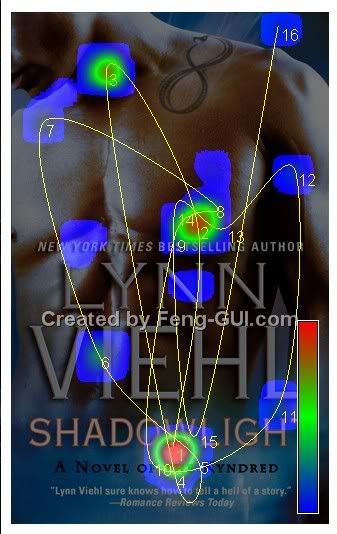
According to the site, the heatmap information should be interpreted as follows:
"Heatmap color - The more intense the color (from blue to red), the more interest the viewer is. * Hotspots - Fixations - Regions of interest. The circles represent the focal points and their size.
Hotspots Order - The number next to the circle, represent the order in which the eyes move.
Gaze Saccades - The lines represent the movements of the eyes between hotspots.
Which areas are being ignored. If there is no color or circle in an area, that section has no interest."
I'm glad to know that my title and byline were the first thing the simulator looked at; that's a little reassuring. Not that I mind it then looking at the nice young man on the cover; kind of difficult to ignore him.
I don't know how accurate the results are, but this might be an interesting generator to try if you're putting together your own cover art or web page design and want to see what it thinks your hottest spots are.
"Feng-GUI simulates human vision during the first 5 seconds of exposure to visuals, and creates heatmaps based on an algorithm that predicts what a real human would be most likely to look at. This offers designers, advertisers and creatives, a Pre-testing technology that predicts performance of an image, by analyzing levels of attention, brand effectiveness and placement, as well as breaking down the Flow of Attention."
To test drive the service, I uploaded my latest cover art into the online generator (which you can use for free, but only once every five hours, btw. Also, they seem to save a copy of whatever you upload, at least temporarily, so I wouldn't upload anything you don't want the world to see.)
Here's the heatmap I got in return:
According to the site, the heatmap information should be interpreted as follows:
"Heatmap color - The more intense the color (from blue to red), the more interest the viewer is. * Hotspots - Fixations - Regions of interest. The circles represent the focal points and their size.
Hotspots Order - The number next to the circle, represent the order in which the eyes move.
Gaze Saccades - The lines represent the movements of the eyes between hotspots.
Which areas are being ignored. If there is no color or circle in an area, that section has no interest."
I'm glad to know that my title and byline were the first thing the simulator looked at; that's a little reassuring. Not that I mind it then looking at the nice young man on the cover; kind of difficult to ignore him.
I don't know how accurate the results are, but this might be an interesting generator to try if you're putting together your own cover art or web page design and want to see what it thinks your hottest spots are.
Subscribe to:
Posts (Atom)
