Ten Word Count Widgets for NaNoWriMo
AllIndieWriters.com's Wordcount Tracker
Another Little Progress Meter
Critique Circle's Word Meter Builder
Language is a Virus's simple NaNoWriMo Word Meter
NaNoWriMo's page of official participant wordcount meters
ProgPress is a word meter plug-in for the WordPress (hasn't been updated in a while, so caveat emptor)
StoryToolz's word count meters page (must register to gain access but it's free)
Writeometer, which I think is an Android App
Writertopia's two wordcount meters
Writing Journal, which is a free iTunes time tracker & word meter
Showing posts with label wordcount. Show all posts
Showing posts with label wordcount. Show all posts
Saturday, October 17, 2015


Thursday, November 10, 2011
NaNoWidgets
A quick heads up before I hit the road: I noticed this morning that the NaNoWriMo site folks had finally posted this year's batch of wordcount widgets. Looks like they're for officially registered users only, but all the same a nice variety.
Also, my thanks to everyone who invested in Nightshine since release day. While it probably won't make an appearance on the Times list, the novel performed well on B&N's lists, coming in at #12 on their romance mm and #38 on their overall mm bestseller lists. The e-book sales for this book are particularly strong, too, and altogether made my editor quite happy.
Also, my thanks to everyone who invested in Nightshine since release day. While it probably won't make an appearance on the Times list, the novel performed well on B&N's lists, coming in at #12 on their romance mm and #38 on their overall mm bestseller lists. The e-book sales for this book are particularly strong, too, and altogether made my editor quite happy.
Tuesday, October 25, 2011
NaNoWriMo Prep I: The Mountain
 The UpHill Battle
No matter where you are with your work, the prospect of writing a novel can be very intimidating. For one thing, it's a big project. And a mean one. A book-length story can be a demanding harpy from hell who is never, ever satisfied. Hundreds of blank pages, waiting to be filled; all those words that have to be written. And collectively the book has to be original, interesting, correct, logical, creative -- and that's simply to make it readable. If we're talking major-house publishable, then up the wattage to dazzling, inventive, jaded-editor-stunning . . .
Before you even approach the book mountain, you first have to wade through every failed story, every abandoned partial manuscript, every single page you ripped out of the printer and crumpled or tore to pieces. You have to get past the sneering effigy of every person who has ever told you that you can't do it, or that you'll do it badly, or that as a writer you suck, or otherwise kicked you in the story cods.
Okay, so somehow you find the courage to fight through all that (probably because like me, you’re just that stubborn) and you're finally standing at the mountain's base, and you're ready to climb. Only you can't stop looking at how far it is to get to the top, and you're already tired and worried and scared. You're convinced that it's never going to be the way you see it in your head. So why put yourself through this?
Stop Looking at the Damn Mountain
I think the biggest obstacle to writing a book is thinking “Hey, I’m writing a book. Oh, God, I'm writing a book.” Actually, you’re not. No one, no matter how fast they are, can write an entire book all at once. The book happens in stages. At any stage of creation you will be writing words, sentences, and paragraphs that are part of a book. During one session you may write a page, a scene or an entire chapter; if you're very lucky you'll write multiple pages, scenes, maybe two or three chapters.
That’s what I suggest you think about every time you sit down to write. Not the whole book, not the mountain, not the enormity of what you're hoping to accomplish in thirty days for NaNoWriMo. Today's session, the stage you can manage to do now, is where your head needs to be.
To figure out what that is, I suggest setting a daily writing goal or quota. You don’t have to, but it helps to keep track of what you need to do and what you've already done. If you're joining in NaNoWriMo, your preset goal is to write at least 50,000 words in 30 days. That would make your daily goal approximately 1667 words, or about seven double-spaced manuscript pages (and I know all of you are not going to be writing daily, so adjust that quota to whatever your writing schedule will be for the month.)
If NaNoWriMo were a mountain to be climbed, it would be 50,000 feet high. Fortunately if you write every day in November, you have only 1667 feet to climb per day.
Jinxing the Climb
As you're heading up the book mountain there will be things that try to kick you back down to the bottom. Everyone has their own set of writing jinxes, but there are a few that I think are pretty universal.
Uncertainty over the writing seems to make writers do two things: go silent, or talk too much about it. I'm of the go silent and not share anything with others mentality, primarily because I've tried the talk about it too much method and it's always jinxed me (which is also why I rarely if ever discuss a book I'm actively writing with anyone but the agent or the editor.) I think for me it's because I have enough of my own doubt to deal with; I don't need additional contributions from outside sources. Also, I've been derailed in the past by well-intentioned but bad advice; one time it almost cost me a three-book contract. I recommend not talking about too much. Exception: if you have a wonderful reader or writer friend, critique partner or family member who is always genuinely helpful to you as a sounding board, this may actually help your climb.
Judging the writing before the book is done is another common climbing jinx. It usually happens in the middle of chapter three, when you suddenly suspect everything you've written is complete crap. This is like being ten thousand feet up the mountain and deciding that all the climbing you've done sucks, so naturally you can't climb any higher. Sounds stupid, right? Well, it is. No one is born knowing how to climb a mountain or write a book. You have to learn how to do it, and the only way I know is to do it over and over until you get it right.
More often than not this judging jinx comes from your own doubts and fears, which will certainly knock you off the mountain if they can. You can stop, fall down, start over, give up, or you can agree with your doubt 100% but keep writing. Just stop worrying about what you've already climbed and keep going up. Why should you do that? Because you can always edit and rewrite whatever you don't like later.
The final jinx I want to mention is a malady among writers commonly referred to as writer's block. Or, you just can't write. For a long time I didn't believe in it, but I've watched too many writer friends suffer from it to doubt it's real.
I don't get what I'd call writer's block. I get tired of writing, I don't feel like writing, or something gets between me and the page that stops me from writing. Publishing is the #1 cause of this. Distractions are #2. Depression is #3. I deal with the causes as quickly and efficiently as I can. I do everything I can to keep Publishing out of my writing space, from unplugging from the internet to turning off the phone. Since Publishing in general has absolutely no respect for my writing time, I don't feel the slightest bit guilty about kicking it out of my writing space when necessary. As for distractions, I remove them, or remove myself to a distraction-free writing space. If they have one, I highly recommend the quiet room at your local public library.
Depression is what it is, and there's no easy way around it. I'm particularly fortunate in that no matter how I feel, I'm an insomniac who hates television and can't stand sitting around and doing nothing. Thus if I'm so depressed that I can't write, I go fold laundry, or vacuum the living room, or mop the kitchen until I feel better. Cleaning helps me work out a lot of frustrations and negative energy, and afterward my house looks great and I feel good about that. I also walk the dogs, play ball with them, garden, quilt, cook, or do anything that naturally helps lighten my mood. For me the key to fighting depression is to do something else besides feeling depressed. So try getting active. Do something physical. If the weather permits, go outside, commune with Nature. Or do something that you really love other than writing.
Next up: I'll discuss the gang you can take with you on your climb -- your story's characters -- and what you can do to make them outstanding. But in the meantime, anyone have any questions? Please post them in comments.
Book Mountain Climbing Tools: Another Little Progress Meter ~ NaNoWriMo Word Meter ~ Word Count Tool ~ WordFlood 1.2 freeware ~ Writertopia's Progress Meters
Image credit: © Emmanuel Lacoste | Dreamstime.com
Wednesday, March 16, 2011
Excel Your Goals
When you're constantly working under one or more deadlines, keeping track of your writing progress is important. I think most writers have some system they use with their work, such as jotting their numbers on a note they tape to their monitor or posting and updating one of those Nanowrimo WIP trackers on their blogs. One of my writer friends uses a virtual calendar/reminder program to nudge him on his goals; it actually sounds an alarm every morning, too.
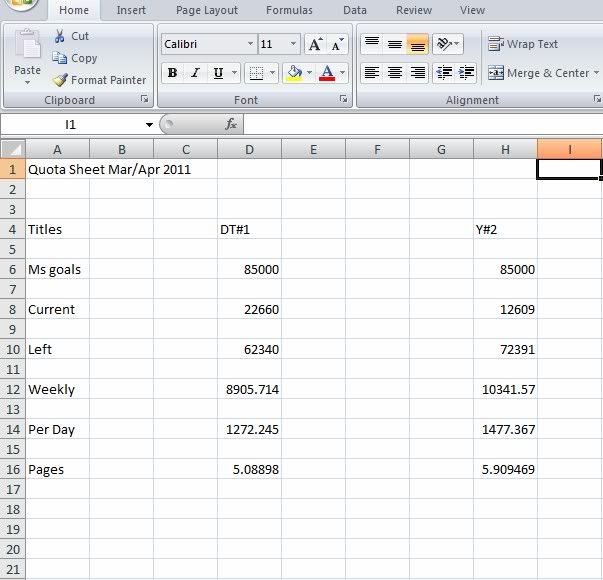 I'm hardly an expert with Microsoft Excel, but it's enough like the ancient Lotus program I trained on as a bookkeeper back in the Jurassic era that I can use it without making a mess of things. In addition to my budgets and general ledger, I also use it to run simple writing quota spreadsheets that track my progress and project my work schedule (to see a larger version of this screen shot, click on the image.)
I decided to start using a spreadsheet because I usually write more than one novel at a time, and having all the counts on one sheet allows me to plan my time better. I also used easy formulas so all I have to do is record the total wordcount for each manuscript at the end of the writing day, and Excel does all the rest.*
I'm presently tracking two novels under deadline, mainly as both are due to my editors on the same day. After labeling the columns with the file codes I use for the titles, I list the ms goals for each one (whatever the wordcount limit for the entire novel is.) In this case both books have a limit of 85K.
"Current" represents the total wordcount I've completed for each manuscript. To determine how much I have left to write, I subtract current from ms goal, which results in the figures in the "Left" row.
"Weekly" calculates what my weekly wordcount goal is for each book. This is calculated by dividing "Left" by the number of weeks I have left to write (in this case, seven. This is the only formula I adjust weekly; next Monday I'll change the seven to a six. I'm sure you spreadsheet experts out there can figure out a better formula for this row.) If you have different deadlines for different novels, remember to adjust your weekly formulas accordingly.
"Per day" divides the "Weekly" figure by seven to show how much I have to write daily for each book.
"Pages" divides the "Per day" figure by 250 (this because one manuscript page is roughly equal to 250 words.)
To update the sheet, at the end of the writing day I put in my new current numbers, and Excel recalculates everything for me. At the end of the week, I adjust the number of weeks I have left by -1, and that's basically it.
The numbers can seem intimidating at first, but you'll find they can be motivational, too. If I want to take a day off, I know with one glance that I have to write an extra ten pages to "buy" the time for myself. I also like seeing the per day figure drop when I write consistently over quota, so I usually do more than I strictly have to. Also it helps to know what you are committed to already before you take on any other writing projects, and having all your counts in one place can give you an exact look at what your current workload is.
One thing you don't want to do is neglect a spreadsheet. If you set up a daily quota sheet like mine, be sure to update it at least a couple times a week, and keep an eye on your projected work figures. If your per day or per week figures are starting to climb then you're not making your goals, and you need to address that well before you get too close to your deadline.
Also, always be sure to leave enough time in your writing schedule for things like days you may be doing things other than writing (family events, holidays, etc.) This goes for the other tasks you need to do for your novel. For example, I edit whatever I write daily, so all I need when the book is finished is time to do my final read-through edits. If you prefer to wait to do all your editing until the manuscript is finished, allow an extra week or two (or however long you think it will take you) of time before your deadline.
Now it's your turn: do you have a system for tracking your writing progress? Are there any programs you find particularly helpful? Let us know in comments.
*If you'd like to copy my spreadsheet and the formulas I've used, you can download it in excel format here. Just remember to change the totals for your current and ms goals, and adjust the formula for the weekly count to reflect the number of weeks you have left until your deadline.
I'm hardly an expert with Microsoft Excel, but it's enough like the ancient Lotus program I trained on as a bookkeeper back in the Jurassic era that I can use it without making a mess of things. In addition to my budgets and general ledger, I also use it to run simple writing quota spreadsheets that track my progress and project my work schedule (to see a larger version of this screen shot, click on the image.) I decided to start using a spreadsheet because I usually write more than one novel at a time, and having all the counts on one sheet allows me to plan my time better. I also used easy formulas so all I have to do is record the total wordcount for each manuscript at the end of the writing day, and Excel does all the rest.*
I'm presently tracking two novels under deadline, mainly as both are due to my editors on the same day. After labeling the columns with the file codes I use for the titles, I list the ms goals for each one (whatever the wordcount limit for the entire novel is.) In this case both books have a limit of 85K.
"Current" represents the total wordcount I've completed for each manuscript. To determine how much I have left to write, I subtract current from ms goal, which results in the figures in the "Left" row.
"Weekly" calculates what my weekly wordcount goal is for each book. This is calculated by dividing "Left" by the number of weeks I have left to write (in this case, seven. This is the only formula I adjust weekly; next Monday I'll change the seven to a six. I'm sure you spreadsheet experts out there can figure out a better formula for this row.) If you have different deadlines for different novels, remember to adjust your weekly formulas accordingly.
"Per day" divides the "Weekly" figure by seven to show how much I have to write daily for each book.
"Pages" divides the "Per day" figure by 250 (this because one manuscript page is roughly equal to 250 words.)
To update the sheet, at the end of the writing day I put in my new current numbers, and Excel recalculates everything for me. At the end of the week, I adjust the number of weeks I have left by -1, and that's basically it.
The numbers can seem intimidating at first, but you'll find they can be motivational, too. If I want to take a day off, I know with one glance that I have to write an extra ten pages to "buy" the time for myself. I also like seeing the per day figure drop when I write consistently over quota, so I usually do more than I strictly have to. Also it helps to know what you are committed to already before you take on any other writing projects, and having all your counts in one place can give you an exact look at what your current workload is.
One thing you don't want to do is neglect a spreadsheet. If you set up a daily quota sheet like mine, be sure to update it at least a couple times a week, and keep an eye on your projected work figures. If your per day or per week figures are starting to climb then you're not making your goals, and you need to address that well before you get too close to your deadline.
Also, always be sure to leave enough time in your writing schedule for things like days you may be doing things other than writing (family events, holidays, etc.) This goes for the other tasks you need to do for your novel. For example, I edit whatever I write daily, so all I need when the book is finished is time to do my final read-through edits. If you prefer to wait to do all your editing until the manuscript is finished, allow an extra week or two (or however long you think it will take you) of time before your deadline.
Now it's your turn: do you have a system for tracking your writing progress? Are there any programs you find particularly helpful? Let us know in comments.
*If you'd like to copy my spreadsheet and the formulas I've used, you can download it in excel format here. Just remember to change the totals for your current and ms goals, and adjust the formula for the weekly count to reflect the number of weeks you have left until your deadline.
Monday, April 27, 2009
Count 'Em Ten
Ten Things About Word Counters
Freeware caution: always scan free downloads of anything for bugs and other threats before dumping the programs into your hard drive.
If you're looking for a wordcounter widget that uses straight HTML versus images, check out Another Little Progress Meter (and here's what it looks like on a blog.)
The Dreaded Daily Word Count by Chris Stewart takes a practical look at wordcounting and suggests how you can custom design a daily quota you can live with.
Allena Tapia has some good tips on how to trim your numbers in her About.com article Five Ways to Cut Down Your Word Count.
LanguageIsAVirus has an online wordcount code generator (which looks like this on a blog.)
StoryToolz requires you to register first (free), but then you can get their progress meter.
If you just wanted to count your words and don't trust your word processor, cut and paste your text into the box at Word Count Tool, click submit, and get your count.
Word Counter is a "Macintosh OS X application that performs a word count and a character count, but it can do much more. It can be used independently or in conjunction with other applications such as TextEdit, Microsoft Word, Pages, TextWrangler, and others" (OS:Macintosh OS X 10.5 or higher)
The Word Counter Widget is a "Dashboard Widget for Macintosh OS X. It provides word counts and character counts and can also count the number of instances of a specified word or phrase" (OS: Mac OS X 10.4 or later)
WordFlood 1.2, which offers customizable word and phrase lists, one-click word usage frequency stats and a displayed worcounter, is now being offered as freeware (OS: Windows 2000/NT/XP/Vista)
Writertopia offers two free wordcount widgets; one that is a simple, no-frills meter, and the other to display your mood as well as your progress.
Freeware caution: always scan free downloads of anything for bugs and other threats before dumping the programs into your hard drive.
If you're looking for a wordcounter widget that uses straight HTML versus images, check out Another Little Progress Meter (and here's what it looks like on a blog.)
The Dreaded Daily Word Count by Chris Stewart takes a practical look at wordcounting and suggests how you can custom design a daily quota you can live with.
Allena Tapia has some good tips on how to trim your numbers in her About.com article Five Ways to Cut Down Your Word Count.
LanguageIsAVirus has an online wordcount code generator (which looks like this on a blog.)
StoryToolz requires you to register first (free), but then you can get their progress meter.
If you just wanted to count your words and don't trust your word processor, cut and paste your text into the box at Word Count Tool, click submit, and get your count.
Word Counter is a "Macintosh OS X application that performs a word count and a character count, but it can do much more. It can be used independently or in conjunction with other applications such as TextEdit, Microsoft Word, Pages, TextWrangler, and others" (OS:Macintosh OS X 10.5 or higher)
The Word Counter Widget is a "Dashboard Widget for Macintosh OS X. It provides word counts and character counts and can also count the number of instances of a specified word or phrase" (OS: Mac OS X 10.4 or later)
WordFlood 1.2, which offers customizable word and phrase lists, one-click word usage frequency stats and a displayed worcounter, is now being offered as freeware (OS: Windows 2000/NT/XP/Vista)
Writertopia offers two free wordcount widgets; one that is a simple, no-frills meter, and the other to display your mood as well as your progress.
Subscribe to:
Posts (Atom)
